
HR Manager plans and training
Scale training, sickness cover and insurance without overloading one manager.
Decision first
Add HR when its background training and coverage save more operational disruption than the HQ payroll costs.
A headquarters HR function is a capacity-limited control system for training, temporary sickness cover and employee administration. It does not remove the need to design schedules, approve permanent replacements or fund benefits.
Seat the HR manager at a compatible headquarters desk.
Complete operating playbook
- ARTICLE LENGTH
- 6,384 words
- DEEP-DIVE SECTIONS
- 16
- RESEARCH LEDGER
- 13
What HR management actually automates in 1.0
A headquarters HR function is a capacity-limited control system for training, temporary sickness cover and employee administration. It does not remove the need to design schedules, approve permanent replacements or fund benefits.
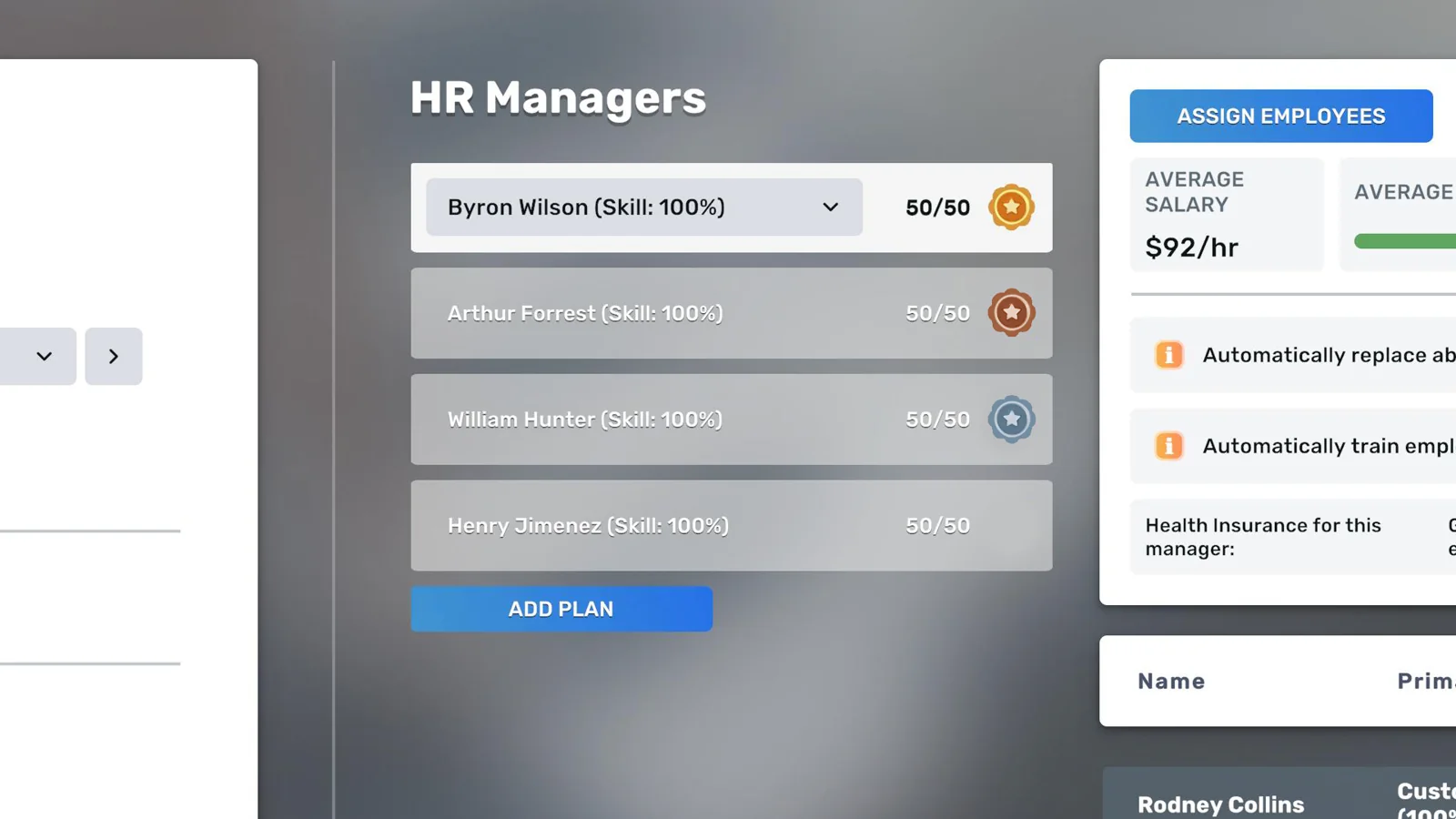
An HR manager becomes operational only after the employee has a compatible headquarters desk, scheduled hours and an HR plan. The plan then receives a selected group of employees up to the manager's displayed capacity. Assigned workers can receive passive skill development without being removed from their operating schedules, which is the main advantage over repeated manual training. The plan is also the organizational anchor used by health-insurance administration and by a linked headhunter for permanent replacement automation. A manager sitting at a desk with no plan is payroll, not management capacity.
Separate three meanings of coverage. HR assignment means the worker belongs to a manager's plan. Temporary replacement means the HR system supplies short sickness cover so the scheduled position is not simply abandoned. Permanent replacement means a linked headhunter searches after quitting, poaching or retirement. These are distinct processes with different prerequisites. The developer has specifically described HR temporary cover as sickness cover, while the headhunter handles permanent loss. Treating HR as a universal spare-worker pool leads to unexplained gaps when a resignation occurs.
The useful management objective is continuity at acceptable total labor cost, not a full green dashboard at any price. A skilled HR manager can administer more employees and accelerate their development, but the function still consumes a desk, wages, headquarters rent, possible insurance premiums and headhunter expense. Track the value it protects: avoided closure hours, reduced manual training downtime, lower turnover, and the output gain from improved skills. If a tiny organization has stable staff and no insurance need, manual administration can temporarily be cheaper; once failures propagate across several businesses, centralized HR usually earns its overhead.
Action checklist
- Seat the HR manager at a compatible headquarters desk.
- Schedule the manager during valid working hours.
- Create an HR plan rather than relying on desk assignment.
- Assign employees without exceeding the displayed capacity.
- Link a headhunter only when permanent replacement is required.
- Measure avoided disruption as well as direct payroll.
| Function | Primary owner | What it covers | Common mistaken assumption |
|---|---|---|---|
| Passive training | HR plan | Assigned employees' ongoing skill development | The employee must be removed from the business |
| Sickness continuity | HR manager | Temporary cover for a sick scheduled worker | It replaces every absence permanently |
| Permanent replacement | Linked headhunter | Quit, poaching and retirement replacement | HR alone recruits the successor |
| Insurance administration | HR plan plus hospital contract | Access to negotiated health plans | A seated HR manager activates insurance automatically |
Build 3674 evidence boundary and stale-cap warning
HR advice changed repeatedly during Early Access. The safest current guide labels inherited mechanics, identifies later confirmations and gives the interface priority where a patch could alter a number.
This guide targets the public 1.0 branch at Build 3674. The release hotfix is directly relevant to headquarters because it fixed employees becoming stuck while trying to quit, a state that could block training, imports and deliveries. It also expanded employee schedule tooltips. Before dismantling an HR plan after an apparent freeze, verify the build, advance one ordinary day and inspect whether the affected worker is still in a quit transition. A symptom captured on the launch build is not evidence that the Build 3674 plan logic remains broken.
Reject the old twenty-five-employee full-skill HR cap. That number was developer-confirmed in 2023 and therefore appears in many guides, but later developer troubleshooting and 2025–2026 discussions use ten as the low-skill baseline and fifty as the fully developed manager's normal capacity. The exact capacity at intermediate skill should be read from the plan, not extrapolated from a fan formula. Difficulty, reset state or a defect can also produce a surprising value, so report the displayed numerator, denominator, skill and build together.
Historical patch notes remain valuable for provenance: EA 0.2 introduced health insurance tied to HR skill, EA 0.3 introduced headhunters and HR-linked automatic replacement, and later updates revised scheduling and training behavior. They are not all current numeric authorities. When an old design statement conflicts with a Build 3674 interface or a version-labelled reproducible test, preserve the old statement only as a caveat. In particular, the old claim that training a cheap recruit must remain cheaper than hiring at one hundred skill has been challenged by a March 2026 player test in which trained lawyers and HR managers ended with higher wages.
Action checklist
- Confirm the executable displays Build 3674.
- Reject twenty-five as the current full-skill HR cap.
- Record displayed capacity rather than assuming a formula.
- Advance a day after updating before rebuilding plans.
- Label Early Access patch facts as provenance, not automatic current truth.
| Claim | Current treatment | Reason |
|---|---|---|
| Full-skill HR capacity is 25 | Reject | Developer-confirmed early value superseded by later 50-cap evidence |
| Low-skill baseline is commonly 10 | Use with interface check | Later discussions describe ten after reset |
| A maxed HR normally handles 50 | Current working rule | Repeated 2025–2026 developer/community context |
| Training always beats hiring at 100 skill | Do not assume | Recent version-labelled wage test found counterexamples |
Headquarters prerequisites and plan construction
Most apparent HR bugs are broken links. A deterministic setup order makes the missing prerequisite visible and avoids firing a capable manager for a configuration error.
Start with a headquarters of sufficient desk capacity. Place a compatible workstation, hire the HR manager through the office-role recruitment channel, assign that employee to the headquarters and give the employee a legal weekly schedule. Then create the HR plan, select the manager, and add eligible employees. For insurance, the manager must also be selected for the negotiated plan. For permanent replacement, link an operational headhunter to the HR manager. Check every link after moving headquarters, swapping desks, training a manager manually or changing schedules.
The plan's employee list is an allocation decision, not a decorative directory. Assign workers whose development or continuity value is highest first. A new specialist with low skill and a costly role may deserve a slot before a fully trained cashier in a low-volume shop. A single manager can cover employees across businesses as long as the plan accepts them; the operational cost of a failure, rather than physical proximity, should determine priority. Keep a small capacity margin if the organization hires frequently, because a plan at the exact cap cannot absorb an urgent recruit without first moving someone.
Use a link audit in this order: headquarters selected, workstation valid, employee assigned, schedule valid, HR plan active, manager selected, managed worker included, insurance or headhunter link present. Then inspect whether any participant is sick, in training, resigning or outside scheduled hours. This sequence distinguishes configuration from capacity and transient status. Replacing furniture, recreating every schedule or dismissing staff before completing it destroys evidence and can make the original problem impossible to reproduce.
Action checklist
- Select the intended headquarters before recruiting office roles.
- Give the manager a desk and a valid schedule.
- Create and name one plan per management group.
- Prioritize high-cost and developing employees.
- Reserve capacity for imminent hires when practical.
- Run the link audit after every HQ move or training event.
Capacity planning and the current fifty-person ceiling
Plan capacity is a scarce operational resource. It should be budgeted like warehouse destinations or customer stations, with headroom for hiring and failures.
For Build 3674 planning, use fifty managed employees as the normal upper bound for a fully skilled HR manager and treat the plan's displayed capacity as authoritative. A low-skilled or reset manager may show ten, with capacity rising as skill improves. Do not encode a straight-line relationship unless your own test demonstrates one; the UI can use thresholds or rounding. Capacity is consumed by assigned employees, not by their scheduled weekly hours, so ten part-timers use ten slots just as ten full-timers do.
A practical sizing calculation is required managers = ceiling(managed headcount divided by usable capacity per manager). Usable capacity should be lower than the hard cap when the company is expanding. With 118 employees and fully trained managers, the mathematical minimum is ceiling(118/50)=3. At a ten-percent reserve policy, use 45 planned slots per manager: ceiling(118/45)=3, leaving seventeen open slots. At 140 employees the hard minimum is still three, but the reserve calculation becomes ceiling(140/45)=4; the fourth manager buys safe onboarding capacity rather than immediate necessity.
Capacity fragmentation matters. Three plans with 49, 49 and 2 workers technically have fifty open slots in aggregate, but the tiny group may attach to a poorly scheduled or low-skill manager and insurance relationships may not match. Rebalance by business criticality and shared benefit plan, not merely by filling the first manager to fifty. Keep each employee assigned to exactly one intended HR owner, and maintain a reconciliation total: total active employees, intentionally unmanaged employees, managed employees and open slots. The equation should balance every audit.
Action checklist
- Read each plan's displayed capacity.
- Count people, not full-time equivalents.
- Use ceiling(headcount/usable capacity) for manager count.
- Keep expansion headroom instead of filling every plan to the cap.
- Reconcile active, managed and intentionally unmanaged totals.
| Managed headcount | Capacity assumption | Managers | Open slots | Interpretation |
|---|---|---|---|---|
| 40 | 50 each | 1 | 10 | One maxed manager with modest reserve |
| 50 | 50 each | 1 | 0 | Hard-cap operation; next hire requires action |
| 51 | 50 each | 2 | 49 | Second manager is required despite low utilization |
| 118 | 45 usable each | 3 | 17 | Ten-percent reserve policy |
| 140 | 45 usable each | 4 | 40 | Fourth manager preserves growth headroom |
Worked HR organization for a 118-person company
A worked allocation shows why grouping by consequence and benefit design is more useful than assigning employees in hiring order.
Assume six retail businesses employ sixty-four people, two offices employ thirty-two, a warehouse and factory employ fourteen, and headquarters employs eight. Three one-hundred-skill HR managers each display fifty capacity. Group A receives forty-four retail employees from the highest-revenue stores. Group B receives twenty retail employees plus twenty-two office workers, for forty-two. Group C receives ten remaining office workers, fourteen warehouse/factory workers and eight HQ specialists, for thirty-two. Total managed headcount is 118 and open capacity is thirty-two.
Why not create groups of fifty, fifty and eighteen? Group C contains the roles whose absence can disrupt many businesses: drivers, logistics staff, purchasing agents and headhunters. Leaving its manager with extra capacity allows urgent specialists to join immediately and makes auditing the dependency cluster easier. Groups A and B still have enough margin for seasonal hires. If insurance plans differ, regroup around tier requirements before adopting this layout; an employee should not be placed under a cheaper plan if a mature Important or Critical demand requires a stronger tier.
Schedule each HR manager for a stable full-time block, such as Monday through Friday 09:00–17:00, while satisfying that manager's own demands. The managed workers can operate outside those hours; however, any observed timing dependency should be tested before assuming instantaneous service. Create a Monday audit: compare each plan count with the employee roster, scan unassigned new hires, review workers in training or quitting states, and inspect headhunter links. On Friday, record sickness gaps, temporary cover, new candidates and next week's expected hires so Monday changes are deliberate.
Action checklist
- Group employees by operational consequence and insurance need.
- Give dependency-heavy roles extra capacity margin.
- Verify all 118 employees appear exactly once.
- Schedule HR managers consistently and satisfy their own demands.
- Run Monday reconciliation and Friday exception review.
| Plan | Retail | Office | Operations | HQ | Total | Open at 50 |
|---|---|---|---|---|---|---|
| A | 44 | 0 | 0 | 0 | 44 | 6 |
| B | 20 | 22 | 0 | 0 | 42 | 8 |
| C | 0 | 10 | 14 | 8 | 32 | 18 |
| Company | 64 | 32 | 14 | 8 | 118 | 32 |
Demand priority inside an HR portfolio
Critical, Important and Nice to Have describe satisfaction weight, not a moral ranking. HR grouping and benefit spending should target the demands most likely to cause net decline.
Employee status—full-time or part-time—is generally Critical. Health insurance is described by a current developer reply as Important. Other demands may concern shift length, days, time windows or environment. Meeting a Critical item can outweigh a lower-priority miss, while two unmet Important items can overcome that gain. Therefore the right question is not how many boxes are green, but whether the weighted result and daily trend are positive for that employee.
Build a demand ledger with employee, role, present skill, employment type, each demand and priority, satisfaction trend, insurance tier, plan owner and schedule exception. Sort first by negative trend, then by operational consequence, then by cost to fix. A fully trained logistics manager losing satisfaction deserves attention before a replaceable trainee whose net trend remains positive. Do not overbuy a gold plan merely to make a Nice to Have item green if a schedule restriction is the real Important conflict.
Demands can appear as skill develops. This makes low-skill hires less predictable than mature headhunted candidates whose current demands are visible and filterable. HR training can therefore create a delayed scheduling or insurance obligation. Audit at skill milestones and whenever the employee detail panel changes. A hiring policy should price this uncertainty: low initial wage plus development cost plus a contingency for newly revealed demands, versus the higher known cost of a mature candidate with a demand profile screened in advance.
Action checklist
- Record priority as well as demand text.
- Use daily satisfaction trend to evaluate the weighted result.
- Escalate negative-trend critical roles first.
- Recheck demands as skill grows.
- Do not equate number of green boxes with retention safety.
| Priority | Planning response | Example control |
|---|---|---|
| Critical | Satisfy by default; document any exception | Keep employment status within the employee's weekly band |
| Important | Compare weight, cost and combined misses | Select adequate insurance or honor a major schedule restriction |
| Nice to Have | Meet when inexpensive and compatible | Prefer a requested day pattern when coverage allows |
Passive training portfolio and wage economics
Passive HR training removes much of the scheduling friction of manual courses, but it is still an investment whose wage and benefit effects must be measured.
A developer reply from January 2025 states that HR can train assigned workers without unassigning them from their businesses. This makes passive development attractive for active revenue roles: output continues while skill rises. Confirm progress in Build 3674 by recording a worker's skill at a fixed daily time for several days while assigned to an active HR plan. Include HR skill, worker role, schedule, sickness and any plan changes in the log. If progress stalls, inspect manager schedule, plan membership and transition states before assuming the feature was removed.
Training cost is not only a course fee. Use development cost = HR payroll allocation + headquarters overhead allocation + any explicit training cost + output lost to interruptions + wage increase caused by higher skill. Passive training reduces the output-loss term, but the other terms remain. Calculate the expected gain using the role's actual output effect: more customer service ceiling, billable throughput, import discount, destination capacity or factory output. A percentage that does not remove a bottleneck may have little immediate value.
Do not rely on the old promise that training a low-skill recruit must end cheaper than hiring at 100 skill. Official EA notes described that intent, but a March 2026 version-labelled comparison reported trained lawyers and HR managers ending at higher hourly wages than directly hiring equivalent max-skill candidates. Reproduce for your role: record accepted wage and skill, training payments and every wage change; then compare with several same-week mature offers after negotiation. Use the lower total present value, not the lower starting wage.
Action checklist
- Record baseline skill and wage before passive training.
- Verify progress at the same in-game time each day.
- Translate skill gain into a role-specific output benefit.
- Include HR payroll and HQ overhead in development cost.
- Benchmark trained outcomes against current mature-candidate offers.
| Path | Include | Hidden risk | Decision rule |
|---|---|---|---|
| Hire low and train | Recruitment, training, HR share, wage growth | Later demands and delayed productivity | Choose only if total present value beats mature hire |
| Hire mature | Agency/headhunter cost and negotiated wage | Higher visible wage or search delay | Choose when known demands and immediate output justify premium |
| Keep current worker | Existing wage and retention controls | Opportunity cost of low skill | Choose when bottleneck value is below development cost |
Manual training, reassignment and return-to-service control
Manual training remains useful for targeted acceleration, but it can interrupt assignments and create a second problem if the worker is not restored correctly.
Older observations describe manual training advancing skill in daily chunks and ending around late afternoon, but those exact timings are version-sensitive and should not be treated as a current universal rule. In Build 3674, test one noncritical worker: record assignment, schedule, skill, wage and current day; enroll for a known duration; observe actual completion time and skill delta; then verify business and HR links. Keep the result labelled by role and build because specialist training economics may differ.
Use manual training when the value of faster skill growth exceeds revenue lost during absence and administrative risk. A new purchasing agent whose negotiation improvement affects large weekly imports may justify acceleration. A cashier in a business already capped by demand probably does not. Compute break-even days = total incremental training cost divided by expected daily contribution gain. If training costs $8,000 including lost output and raises daily contribution by $400, break-even is twenty operating days; if the role's contract or business may change earlier, defer.
Create a return-to-service record before training: employee, business, workstation, recurring weekly hours, HR plan, insurance group and replacement link. On completion, restore each field and compare next-day performance. A worker can appear employed and satisfied yet remain economically absent because the schedule or plan was not reconnected. Avoid training several workers from the same bottleneck simultaneously unless temporary cover is confirmed. Stagger batches so that a failed return affects one workstation, not an entire production stage.
Action checklist
- Test exact training timing on one noncritical Build 3674 worker.
- Calculate break-even from total cost and daily contribution gain.
- Snapshot every assignment before enrollment.
- Stagger workers from the same bottleneck.
- Verify business output and HR membership after completion.
| Input | Worked value |
|---|---|
| Explicit and allocated cost | $5,500 |
| Lost contribution | $2,500 |
| Total incremental cost | $8,000 |
| Expected daily contribution gain | $400 |
| Break-even | 20 operating days |
Sickness, temporary cover and permanent loss
Continuity depends on classifying the event correctly. HR and headhunters solve different horizons, and neither should be credited before the replacement is visibly working.
For sickness, developer guidance says an assigned HR manager can provide temporary cover. Test it with a low-risk workstation: note the sick employee's scheduled hours, plan membership, manager schedule and business staffing display. Advance through the shift and record whether coverage appears and whether sales or production remain stable. Do not infer cover merely because the shop stays open; another overlapping employee may have absorbed demand. Conversely, a revenue dip may reflect stock or demand rather than failed HR cover.
For quitting, rival poaching or retirement, permanent replacement requires a headhunter linked to the relevant HR manager. The headhunter searches for a close or similar candidate, with developer discussion saying the replacement should be younger. This protects continuity but does not guarantee identical wage, mature demands, exact schedule compatibility or immediate arrival. Inspect the candidate and schedule after automation fires. A replacement that accepts but cannot work the vacated shift is not a completed recovery.
Headquarters specialists require special succession design. If the only headhunter is managed by an HR manager who in turn depends on that headhunter, or if the headhunter is the person lost, automation can become circular. Maintain either a second headhunter relationship, spare internal capacity, or a documented manual City Workforce procedure. Test the chain with a save copy before relying on it for a large company. The cost of redundant succession is small compared with a frozen import, logistics or workforce pipeline.
Action checklist
- Classify sickness versus permanent departure.
- Verify temporary cover at the workstation, not from a notification alone.
- Link permanent replacement through a headhunter.
- Audit the successor's wage, demands and schedule.
- Break circular dependencies for HR and headhunter roles.
| Event | Expected mechanism | Verification |
|---|---|---|
| Sickness | HR temporary replacement | Scheduled station remains covered during absence |
| Quit | Linked headhunter | Permanent candidate arrives and is scheduled |
| Rival poaching | Linked headhunter | Replacement workflow starts after loss |
| Retirement | Linked headhunter | Younger close/similar replacement is produced |
| Headhunter loss | Manual or redundant route | Recruitment capacity remains available |
Health-insurance administration and billing caveats
Insurance is an HR-managed contract with tier access, eligibility and a ten-person billing floor. It is not a free morale switch attached to every plan.
The supported workflow is: seat and schedule an HR manager, create the HR plan, visit the hospital, select that manager for an insurance request, wait for the callback or offer, then negotiate and accept. Developer guidance also points players to F1: search HR Manager and follow the hospital and health-insurance links. If the hospital refuses to proceed, first verify that a headquarters is selected, the manager is in an active plan, and enough in-game days have passed for the callback.
Insurance charges have a ten-employee minimum. An early bug caused plans below ten not to activate; the corrective patch changed the behavior so coverage activates but the company is billed for ten. Therefore unit cost is distorted for small groups. If a plan costs P per covered employee and only n employees are enrolled, effective charge per actual enrollee is P times max(10,n) divided by n. At P=$120 and n=4, total is $1,200 and effective cost is $300 each; at n=12, total is $1,440 and effective cost returns to $120 each.
Tier hierarchy matters. Developer guidance says Gold satisfies Gold, Silver and Bronze requirements, while Silver satisfies Silver and Bronze. Higher tiers may require sufficient HR skill and Gold can appear locked when the manager is too weak. Buy to the strongest justified demand in the group, but compare regrouping before upgrading everyone. A current developer reply describes health insurance as Important, so an employee with Critical employment status satisfied can sometimes retain a net-positive trend without it; however, other Important demands may reverse that result. The daily trend is the decision signal.
Action checklist
- Create and staff the HR plan before visiting the hospital.
- Allow the stated callback delay.
- Budget max(10,enrolled) rather than enrolled alone.
- Match plan tier to the strongest justified demand.
- Check HR skill if Gold is locked.
- Evaluate satisfaction trend after enrollment.
| Enrolled | Quoted per person | Billed people | Total | Effective per enrollee |
|---|---|---|---|---|
| 4 | $120 | 10 | $1,200 | $300 |
| 9 | $120 | 10 | $1,200 | $133.33 |
| 10 | $120 | 10 | $1,200 | $120 |
| 12 | $120 | 12 | $1,440 | $120 |
Scheduling the managers and the managed workforce
HR capacity is headcount-based, while employee satisfaction and production are hour-based. A sound design reconciles both systems every week.
Plan the operating roster first. For each business, calculate station-hours = open hours multiplied by simultaneous staffed stations, adjusted for day-specific demand. Then allocate full-time employees in the 30–50 remembered-hour band and part-time employees in the 10–30 band. The auto-scheduler introduced demand-aware filling and later gained shifts up to twelve hours, but its result is a draft. It can satisfy a coverage grid while producing an expensive, demand-incompatible or fragile roster.
Example: a shop needs two cashiers from 10:00–18:00 Monday through Friday and one from 18:00–22:00 Friday and Saturday. Base station-hours are 2×8×5=80 plus 4+4=8, total 88. Use FT-A Monday–Friday 10:00–18:00 for 40 hours, FT-B Monday–Thursday 10:00–18:00 plus Friday 14:00–22:00 for 40, and PT-C Friday 10:00–18:00 plus Saturday 18:00–22:00 for 12. This provides 92 scheduled hours, including a four-hour Friday overlap that can cover a break, training transition or demand spike. If insight proves the overlap idle, shorten PT-C's Friday block while keeping at least ten weekly hours.
After a midweek change, the visible future pattern is not the entire weekly count. Employees remember hours already worked and reset Monday. Inspect Build 3674 worked-hours detail before interpreting a red full-time demand. Schedule HR managers themselves within their own employment band and restrictions; a plan owner with declining satisfaction is a continuity risk. Prefer major redesigns on Monday, and use temporary exceptions during the current week rather than repeatedly editing remembered hours.
Action checklist
- Calculate station-hours before headcount.
- Keep FT workers within 30–50 remembered weekly hours.
- Keep PT workers within 10–30 remembered weekly hours.
- Review auto-fill against demand and wage cost.
- Inspect worked hours before midweek edits.
- Satisfy the HR manager's own schedule demands.
| Worker | Mon | Tue | Wed | Thu | Fri | Sat | Weekly |
|---|---|---|---|---|---|---|---|
| FT-A | 10–18 | 10–18 | 10–18 | 10–18 | 10–18 | — | 40 |
| FT-B | 10–18 | 10–18 | 10–18 | 10–18 | 14–22 | — | 40 |
| PT-C | — | — | — | — | 10–18 | 18–22 | 12 |
Diagnostics: plan not working, training stalled or capacity wrong
Diagnosis should preserve evidence and change one variable at a time. Most HR failures fall into configuration, capacity, transient employee state or outdated expectation.
For a manager not recognized, inspect headquarters selection, desk compatibility, employee assignment, schedule and HR plan membership. For a worker not training, add manager skill, worker skill, observation interval, sickness, manual-training state and quit status. For a capacity mismatch, record build, manager skill, displayed cap, plan count, mods and difficulty. Screenshots should include the full plan header and employee detail rather than a cropped red icon.
The Build 3674 quit-state fix matters when several systems stop together. A worker stuck attempting to quit could disrupt training, imports and deliveries, so simultaneous failures may share one state problem rather than three plan defects. Confirm update, save, advance a normal day and retest. If only one plan fails, move one noncritical employee out and back to determine whether membership refreshes; do not mass-reassign an entire company as the first experiment.
Use a controlled reproduction save. Record time, date and day of week; pause; capture the expected plan state; change one prerequisite; advance only enough time for the expected tick; record the actual result. Repeat with mods disabled if present. A useful report says, for example, 'Build 3674, standard difficulty, Monday 09:00, HR skill 100, displayed capacity 50, 49 assigned; adding employee 50 succeeds and 51 is refused.' That can be compared with current mechanics. 'HR cap is broken' cannot.
Action checklist
- Preserve build, day, time, skill and displayed plan count.
- Check configuration before replacing staff or furniture.
- Consider quit-transition state when several systems freeze together.
- Change one variable per reproduction.
- Disable mods for a base-game report.
- Write expected and actual outcomes numerically.
| Symptom | First check | Controlled test |
|---|---|---|
| Manager absent from plan | HQ, desk, assignment, schedule | Reseat one known-compatible manager |
| Training stalls | Plan membership and transition state | Track one worker across a daily tick |
| Cap seems 10 | Manager skill or reset | Compare displayed capacity after development |
| Insurance unavailable | Active plan and hospital delay | Request with one seated assigned manager |
| Replacement fails | Headhunter link and filters | Use a feasible role and noncircular chain |
Operating metrics and tracking fields
A small workforce ledger turns HR from reactive clicking into a measurable service. It should explain both current state and the next decision.
Employee-level fields should include identifier, role, business, workstation, FT/PT status, scheduled weekly hours, worked hours this week, wage, skill, demands with priority, satisfaction level and daily trend, insurance tier required and received, HR owner, training state, absence state and replacement route. Add last-reviewed date so newly revealed demands are not mistaken for old data. Use the in-game display as the source, not a stale external database.
Plan-level fields should include manager, manager skill and wage, displayed capacity, assigned headcount, open slots, headquarters desk and schedule, passive-training scope, insurance plan and quote, headhunter link, last sickness cover event, last permanent replacement and unresolved exceptions. Financial fields should separate direct HR payroll, allocated headquarters overhead, insurance minimum-floor waste, headhunter payroll and avoided-loss estimates. The goal is decision support, not accounting theater.
Track four ratios: coverage ratio = managed active employees divided by active employees intended for management; capacity utilization = assigned divided by displayed capacity; negative-trend rate = managed employees with negative satisfaction trend divided by managed employees; and continuity success = covered or replaced critical absences divided by critical absence events. High utilization with rising negative trend indicates the plan is technically full but poorly configured. Low utilization may be sensible reserve or unnecessary overhead; annotate the reason.
Action checklist
- Keep employee and plan identifiers stable.
- Capture demands with priorities and review date.
- Separate scheduled hours from remembered worked hours.
- Record displayed capacity and open slots.
- Track insurance floor waste explicitly.
- Measure absence outcomes, not only notifications.
| Metric | Formula | Use |
|---|---|---|
| Coverage ratio | Managed intended employees / intended employees | Find unassigned hires |
| Capacity utilization | Assigned / displayed capacity | Forecast manager need |
| Negative-trend rate | Negative managed employees / managed employees | Detect retention weakness |
| Continuity success | Successfully covered events / critical absence events | Test actual resilience |
| Insurance floor waste | P × max(0,10−n) | Expose small-plan inefficiency |
Weekly audit and change-control routine
Weekly control catches remembered-hour problems, capacity drift and benefit mismatches before they turn into closures or resignations.
On Monday after the weekly hour reset, reconcile every employee with a business, schedule and intended HR owner. Review red employment-status demands only after confirming the new week has begun. Compare station-hours with scheduled-hours by day, then inspect the auto-scheduler's choices. Add planned hires to the capacity forecast even before acceptance so a manager does not hit the cap on arrival day.
Midweek, monitor exceptions rather than redesigning everything. Check sickness cover at critical stations, passive-training progress, newly revealed demands, negative satisfaction trends, headhunter searches and insurance callbacks. If a schedule must change, record hours already worked and estimate the new remembered total. Keep one reversible change per problem. A clean exception log allows Friday analysis instead of repeated trial and error.
On Friday, review labor economics: HR payroll and overhead, insurance billed headcount versus enrolled headcount, recruitment and headhunter cost, wage changes from training, and avoided closure hours. Decide next week's manager allocation and roster changes before Monday. Archive test notes with build number. If a patch changes scheduling, employee state or HR behavior, rerun the smallest relevant test instead of assuming every historical result remains valid.
Action checklist
- Monday: reconcile roster, schedules and plan ownership.
- Monday: forecast capacity including pending hires.
- Midweek: review exceptions and remembered hours.
- Friday: calculate benefit-floor waste and development cost.
- Friday: prepare next week's changes.
- After patches: rerun labelled control tests.
| Cadence | Required outputs |
|---|---|
| Monday | Balanced roster, clean hour bands, plan reconciliation, open-slot forecast |
| Daily exception | Sickness coverage, stalled training, demand change, candidate or insurance callback |
| Friday | Cost summary, continuity outcomes, approved next-week changes |
| After update | Build-labelled regression tests for affected mechanics |
Common failure modes and corrections
The recurring mistakes are predictable: using obsolete limits, confusing temporary and permanent cover, filling plans without priorities, and treating green boxes as the objective.
A player hires a second HR manager because the first supposedly caps at twenty-five. Correction: read the current plan; a fully developed manager normally handles fifty. A player expects HR to replace a resignation. Correction: HR covers sickness temporarily; link a headhunter for permanent loss. A player seats an HR manager but cannot request insurance. Correction: create an active plan, assign the manager and follow the hospital callback workflow.
A company fills every manager to fifty, then an urgent hire is unmanaged. Correction: size from usable capacity with reserve, not the hard cap. Another company spreads staff randomly and upgrades every plan to Gold because one employee requests it. Correction: group by risk and tier requirement, while evaluating each employee's weighted satisfaction trend. A tiny plan looks cheap at the quoted per-person rate but costs far more effectively. Correction: apply the ten-person billing floor before accepting.
Training can also mislead. Starting wage looks low, so a player assumes the trained employee will remain cheaper. Correction: track wage changes and compare total present value with current mature offers. A midweek schedule appears compliant but status stays red. Correction: inspect remembered worked hours and wait for Monday reset where appropriate. Several HQ systems freeze together and the player rebuilds all plans. Correction: verify Build 3674 and investigate the launch quit-state issue first.
Action checklist
- Replace legacy cap assumptions with displayed capacity.
- Assign the correct mechanism to sickness and permanent departure.
- Reserve slots for growth and emergencies.
- Apply insurance minimum billing before comparing plans.
- Audit trained wages against current hiring alternatives.
- Inspect remembered hours and build-specific quit state.
| Failure | Correction |
|---|---|
| Uses 25-person cap | Use displayed cap; max-skill working rule is 50 |
| HR expected to replace resignation | Link headhunter for permanent replacement |
| Insurance quote multiplied by actual small group | Bill at least ten people |
| All plans filled to hard cap | Adopt usable-capacity reserve |
| Training assumed cheapest | Compare full tracked cost with mature offers |
| Midweek red status called a bug | Check remembered worked hours |
Build 3674 reproducible test suite
A compact repeatable suite protects the guide against future patches and separates interface facts from community interpretation.
Capacity test: in a disposable unmodded Build 3674 save, select an HR manager and record exact skill, wage and displayed capacity. Add eligible employees one at a time until refused. Repeat after a measurable skill change and at 100 skill. Report the observed mapping without fitting a formula. Passive-training test: assign one worker, record skill at 09:00 on three consecutive days while all schedules remain stable, then compare with an otherwise similar unmanaged control where feasible.
Sickness test: choose a low-risk staffed position with no overlapping spare, verify HR membership, save, observe a sickness event or controlled reproducible state, and compare station coverage and business output. Permanent-loss test should be done only in a disposable save: link a headhunter, trigger or observe an eligible departure, record delay, replacement role, age, skill, wage, demands and schedule placement. Restore the save rather than damaging the live organization merely to gather evidence.
Insurance test: request the same available tier for groups of fewer than ten, exactly ten and more than ten employees, recording quoted rate, bill and active coverage. Schedule-memory test: record hours worked before a Wednesday change, future scheduled hours and displayed weekly status, then repeat after Monday reset. Every result needs build, difficulty, mods, save provenance, game date and whether the behavior came from F1, UI, patch note, developer reply or direct observation.
Action checklist
- Use a disposable save and disable mods.
- Record Build 3674, difficulty, date and day.
- Keep one manipulated variable per test.
- Capture both expected and actual values.
- Restore the live save after destructive simulations.
- Retest after any patch affecting employees or headquarters.
| Test | Independent variable | Outputs |
|---|---|---|
| Capacity | HR skill | Displayed cap and first refused employee |
| Passive training | HR assignment | Daily skill delta versus control |
| Sickness | HR coverage eligibility | Station coverage and output |
| Permanent loss | Headhunter link | Delay and replacement attributes |
| Insurance | Enrolled headcount | Activation, bill and effective unit cost |
| Schedule memory | Day and prior worked hours | Status before and after Monday reset |
Research ledger
These links establish mechanics or provide a reproducible lead. Any balance-sensitive number still has to be checked in the current save.
Questions answered
How many employees can one HR manager handle in Big Ambitions 1.0?
Use the plan's displayed number. Current Build 3674 planning evidence supports ten as a low-skill or reset baseline and fifty for a fully developed manager. The old twenty-five cap is Early Access advice and should be rejected.
Does an HR manager permanently replace employees who quit?
No. Developer guidance distinguishes temporary HR sickness coverage from permanent headhunter replacement. Link an operational headhunter to the HR manager for quits, rival poaching and retirement, then audit the successor's actual schedule.
Can HR train employees while they remain at work?
A January 2025 developer reply says assigned workers can be trained by HR without being unassigned. Validate progress in Build 3674 by logging skill at fixed daily times and checking manager schedule and plan membership if it stalls.
Why is my HR manager not available at the hospital?
Verify the manager is seated and scheduled in the selected headquarters and is assigned to an active HR plan. Follow the F1 HR Manager link, make the hospital request and allow the callback delay before expecting an offer.
Should every HR plan be filled to fifty?
Usually not. Use a usable-capacity target such as forty-five when expanding, so urgent hires can be added. Group employees by operational consequence and insurance need rather than filling plans solely in hiring order.
Does HR capacity depend on employee hours?
Capacity counts assigned people, not full-time equivalents. A part-time employee consumes a plan slot just like a full-time employee, even though the two contribute different scheduled hours and insurance cost per staffed hour.
Is training a low-skill employee always cheaper than hiring at 100 skill?
No current rule guarantees that. Old official notes stated that design intention, but a March 2026 version-labelled test reported counterexamples for lawyers and HR managers. Track recruitment, training, wage growth, lost output and mature-offer alternatives.
What should I audit every Monday?
After the weekly hour reset, reconcile active employees with business, schedule and HR owner; check plan capacity including pending hires; review demand trends; and compare required station-hours with the roster. Keep midweek changes documented because worked hours are remembered.