
Smart Delivery target formulas
Calculate warehouse targets from combined demand, safety stock and receiving space.
Decision first
Target combined weekly destination demand plus a risk-based buffer, while leaving 15–25% box capacity free for receipts.
Smart Delivery is target-based quantity control; it is not demand forecasting, recurrence, faster shipping, or a guarantee that physical constraints will be ignored.
Identify whether the value belongs to a purchase order or internal route.
Complete operating playbook
- ARTICLE LENGTH
- 5,077 words
- DEEP-DIVE SECTIONS
- 17
- RESEARCH LEDGER
- 8
What Smart Delivery means in 1.0
Smart Delivery is target-based quantity control; it is not demand forecasting, recurrence, faster shipping, or a guarantee that physical constraints will be ignored.
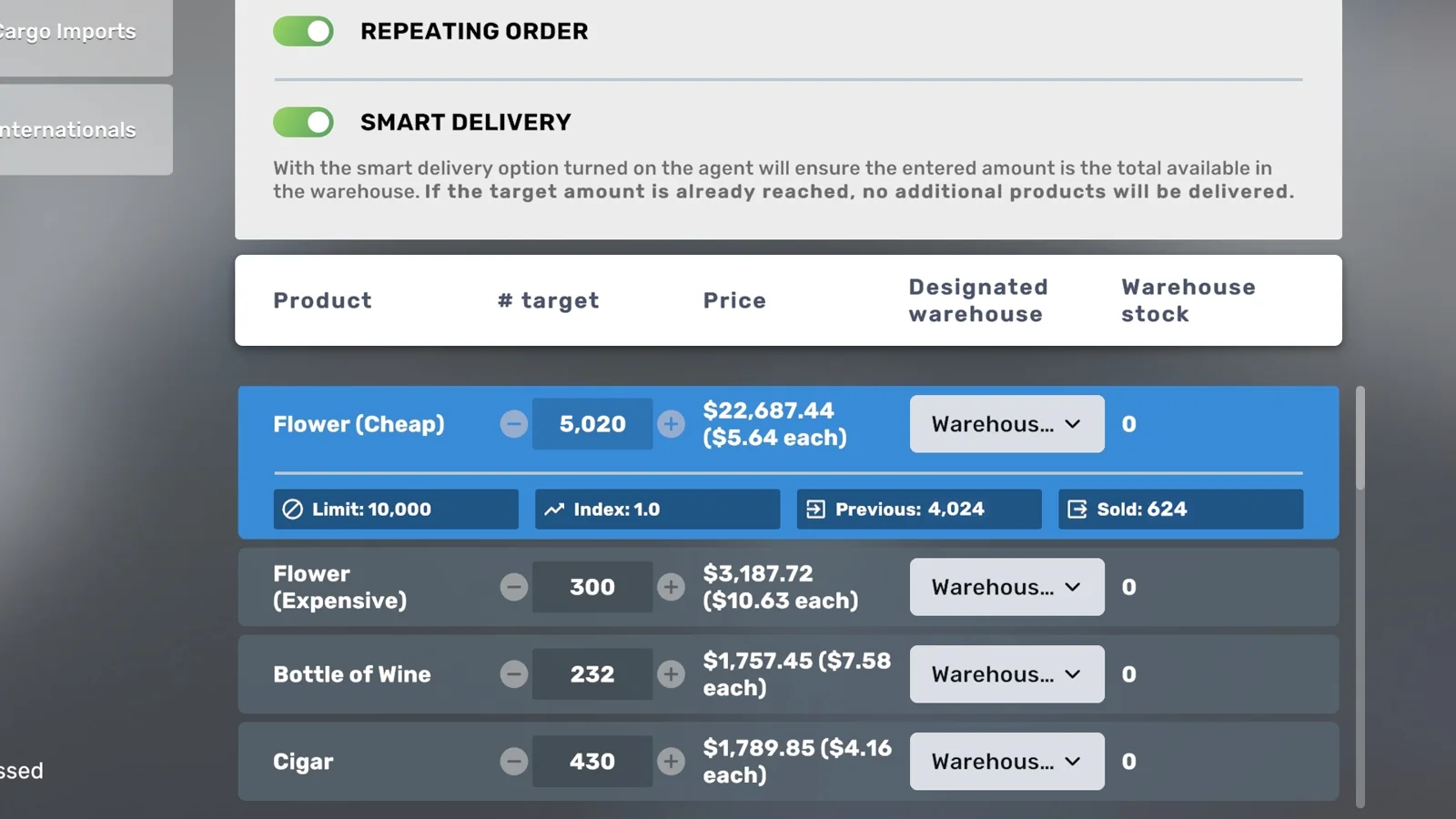
EA 0.9 officially added a manual Smart Delivery toggle for wholesaler/importer ordering as part of the weekly supply redesign. A later developer reply confirmed its calculation: when Smart is active, the system orders only the amount needed to refill toward the player's entered target. The player still chooses that target. The same reply separates recurrence from Smart, so an order can be smart and one-time, fixed and recurring, smart and recurring, or fixed and one-time.
Internal warehouse and factory logistics also uses target replenishment, but the behavior is automatic rather than a forecasting toggle. A developer confirmed that warehouse-to-store values automatically adjust to the destination shortfall; EA 0.10-era discussion applies the same target concept to factory-to-warehouse movement. Use the phrase smart replenishment for that calculation, but do not imply the import-order Smart checkbox controls internal routes. They are separate panels, events, and owners.
Action checklist
- Identify whether the value belongs to a purchase order or internal route.
- Decide who chooses the target and who owns the plan.
- Separate amount logic from timing and recurrence.
- Use build 3674 or later before diagnosing global failure.
| System | Smart behavior | Timing owner |
|---|---|---|
| Importer order | Optional target-fill toggle | Standard Monday 08:00 or selected urgent option |
| Wholesaler order | Use the live order controls; catalogs differ | Live quoted schedule |
| Warehouse to store | Automatically fills toward route target | Daily 02:00 |
| Factory to warehouse | Target-based internal movement | Daily logistics event |
Core target formula and bounds
The target calculation is simple, but actual movement is bounded by several independent constraints.
Let T be the target, H be inventory counted at the destination at calculation time, and R be nominal refill. Then R = max(0, T - H). For a purchase, let L be remaining weekly per-location item limit, A be affordable units at the locked price, and C be units that fit. A conservative model is Q = min(R, L, A, C). For internal logistics replace L and A with source inventory S, giving Q = min(R, S, C). Manager, employee, contract, route, vehicle, and plan validity are Boolean gates: if a required gate is false, Q can be zero even when the arithmetic shortfall is positive.
A developer-endorsed example uses T = 10,000 and H = 9,000, producing a 1,000-unit smart purchase. Without Smart, a recurring 10,000-unit order would buy another 10,000, leaving 19,000 before subsequent use. Internal logistics examples work the same way: a store target of 500 and current total stock of 200 requests 300. H includes inventory on retail displays as well as in storage, which explains many apparently undersized deliveries.
Action checklist
- Record T and H at the actual calculation event.
- Calculate R before checking constraints.
- Apply limit, affordability, space, or source bounds separately.
- Verify every required plan gate.
- Compare actual Q to the bounded prediction, not to T.
| Scenario | T | H | Other bound | Expected Q |
|---|---|---|---|---|
| Import, unconstrained | 10,000 | 9,000 | Above 1,000 | 1,000 |
| Import, limit bound | 10,000 | 4,000 | L=3,500 | 3,500 |
| Route, source bound | 500 | 100 | S=250 | 250 |
| Already full | 500 | 525 | Any | 0 |
Smart and recurring are independent controls
Use the two controls as a four-state decision table rather than treating Smart as an automation master switch.
Smart off and recurring off creates a manually confirmed fixed-quantity order. Smart on and recurring off creates a manually confirmed one-time top-up to target. Smart off and recurring on repeats the same entered quantity each weekly cycle and can accumulate surplus. Smart on and recurring on recalculates the shortfall to the target and repeats the calculation weekly, subject to cash, limits, and storage. The developer explicitly confirmed that recurrence does not alter delivery time and Smart does not supply recurrence.
Choose fixed quantity when predictable consumption and deliberate inventory accumulation make additive ordering useful. Choose target-fill when residual stock varies or storage is costly. Use one-time target-fill for commissioning, recovery after a known withdrawal, or irregular items. Use recurring target-fill for stable ongoing supply. Audit the actual toggle states after replacing an employee, renegotiating a contract, or moving HQ because a recreated plan can preserve the number while losing the intended behavior.
Action checklist
- State whether the number is additive quantity or desired inventory.
- State whether the action repeats automatically.
- Confirm both toggles in the saved plan.
- Test a low-cost SKU before bulk conversion.
- Document the reason for choosing fixed rather than target-fill.
| Smart | Recurring | Amount | Repetition |
|---|---|---|---|
| Off | Off | Entered fixed quantity | One confirmed order |
| On | Off | Shortfall to target | One confirmed order |
| Off | On | Entered fixed quantity | Every standard cycle |
| On | On | Recomputed shortfall | Every standard cycle |
Clock model: lock, logistics, and receipt
Smart quantity depends on inventory at a scheduled calculation, so timestamps are part of the formula.
For ordinary importer plans, a developer-inspected July 2026 save established that the Purchasing Agent must be assigned to the plan before Sunday 20:00. Standard imports arrive Monday at 08:00. Internal logistics runs daily at 02:00 in a May 2026 developer reply. Therefore a Monday 02:00 warehouse route can reduce H before the 08:00 receipt and can also generate a truthful shortage warning that appears inconsistent with the later full warehouse.
When reproducing Smart behavior, define H at the relevant lock or event rather than from a random Sunday screenshot. If the game locks the order after the last Sunday route, record that inventory and any subsequent movement. The official design says the order arrives Monday, but exact internal calculation details beyond the developer's cutoff should be tested rather than assumed. An urgent order is evaluated through its own confirmation and quoted timing; Smart changes amount, not the selected delivery schedule.
Action checklist
- Record inventory immediately before Sunday 20:00.
- Keep the Purchasing Agent in the plan through lock.
- Record Monday 02:00 route movement.
- Record Monday 08:00 receipt.
- Do not compare a pre-route H with a post-route smart result without adjustment.
- Log urgent orders separately.
| Time | Event | Smart-delivery consequence |
|---|---|---|
| Sunday before 20:00 | Plan and employee gate | Invalid plan can prevent order |
| Monday 02:00 | Internal target fills | Warehouse H may fall |
| Monday 08:00 | Standard import receipt | Smart quantity arrives |
| Tuesday 02:00 | Next internal route | New import can reach stores |
Choosing a weekly importer target
A good target covers aggregate demand, the Monday sequencing gap, and forecast uncertainty without exceeding limits or storage.
For an item serving stores i, let a_i be average complete-day unit sales, H = 7 days, g be a growth assumption, F be reliable non-import supply during the week, and B be safety stock. A planning target is T = ceil(H times sum(a_i) times (1 + g) - F + B). If daily demand is 1,200 units across the network, growth is 5 percent, factory supply is 1,400 weekly, and safety stock is 1,000, T = ceil(7 times 1,200 times 1.05 - 1,400 + 1,000) = 8,420.
The target is not the predicted invoice. Smart quantity equals the target shortfall at lock, so residual inventory reduces the purchase. Compare T with the current weekly per-location item limit and warehouse capacity. A target above a hard limit can still be useful as a planning signal, but it cannot bypass the cap. Split demand, add another eligible location, increase production, or accept a constrained service level. Record shortages because observed sales during an out-of-stock day understate true demand.
Action checklist
- Use item units sold, not revenue.
- Aggregate only destinations supplied by the plan.
- Exclude stockout and partial-operation days.
- Subtract only reliable alternate supply.
- Add an explicit buffer and Monday bridge.
- Check live limit and pallet capacity before saving T.
| Input | Evidence source | Risk if wrong |
|---|---|---|
| a_i | Complete in-stock sales days | Systematic underorder |
| g | Known opening/marketing/pricing change | Over- or under-buffer |
| F | Observed factory receipts | Double-counted supply |
| B | Chosen service tolerance | Hidden arbitrary stock |
| T | Calculated result | Plan input, not guaranteed shipment |
Choosing daily store route targets
Store targets cover one internal-delivery interval, while importer targets cover a week; using the same number confuses two horizons.
Let d be expected units sold per day at one store, p be a robust peak complete-day sale, and b be a fractional buffer. A route target can be T_store = ceil(max(d,p) times (1+b)). With d = 360, p = 440, and b = 0.25, target is 550. At 02:00 the warehouse sends only the difference between 550 and current total store inventory. If the store begins with 90, the nominal request is 460; if source stock is only 300, only 300 can move.
The target must physically fit. Retail total includes display units, so a target equal to back-room capacity plus full displays may leave little operational margin. If the store empties late each day, the daily target is too low, storage is insufficient, or demand changed; increasing the weekly importer target alone does not change the amount the store requests. Conversely, repeated destination-space warnings indicate that T_store is above usable capacity or other products are occupying it.
Action checklist
- Calculate one-day cover per store and SKU.
- Use the higher of robust average or observed peak.
- Confirm total display-plus-storage capacity.
- Observe stock immediately before closing or 02:00.
- Adjust the store route target independently from the weekly import target.
| Level | Horizon | Target purpose |
|---|---|---|
| Importer to warehouse | One week plus timing buffer | Replenish network source |
| Factory to warehouse | Chosen distribution reserve | Move manufactured output |
| Warehouse to store | One day plus demand buffer | Prevent intraday stockout |
| Display capacity | Immediate selling capacity | Part of counted destination H |
Storage conversion and false over-order reports
Smart quantities use units, but physical capacity depends on SKU-specific boxes and furniture.
EA 0.9 changed orders to units because products have different box sizes. Let U be expected received units and k be current units per box; expected boxes are ceil(U/k). Let r be free box slots across compatible receiving furniture. Capacity in units is not simply r times one universal constant because k changes by product. Read the current product tooltip and receiving furniture data. Historical patches changed individual box sizes, proving that copied universal shelf capacities are brittle.
Smart prevents additive accumulation above its target only to the extent that the inventory H is counted and remains at the destination. It cannot rescue an unrealistic target that itself exceeds capacity, and it cannot reclaim surplus already routed to another location. If a smart plan appears to over-order, first reconcile H at lock, outbound movement before receipt, units versus boxes, and whether Smart was saved with recurrence. A warehouse that lost stock at Monday 02:00 can correctly receive more at 08:00 than a later screenshot seems to justify.
Action checklist
- Read units-per-box for each SKU.
- Convert receipt units with ceil(U/k).
- Measure free pallet capacity before lock.
- Record outbound movement between lock and receipt.
- Confirm Smart is active on the exact plan/SKU.
- Check for another fixed recurring plan feeding the same destination.
| Observation | Likely explanation | Test |
|---|---|---|
| Receipt exceeds Sunday screenshot shortfall | Intervening 02:00 outflow | Reconstruct H at lock/event |
| Warehouse cannot accept target | Unit-to-box capacity error | Calculate ceil(U/k) |
| Inventory grows weekly | Smart off or duplicate fixed plan | Audit toggles and all HQ plans |
| Smart buys zero | Counted H at/above T | Record pre-lock total inventory |
Weekly limits and constrained target fills
Smart Delivery respects the per-item weekly limit attached to each receiving location.
Official EA 0.9 notes state that items have weekly ordering limits and that the limit is per location. If R is smart shortfall and L is remaining permitted units, limit-constrained quantity is min(R,L) before cash and space. The target field can remain higher than L, but the receipt cannot erase the full shortfall in one standard cycle. Track both values so the remaining deficit is not misclassified as a broken target calculation.
A second receiving location may provide another limit, but it adds a warehouse or factory, contract-plan complexity, pallet storage, and downstream logistics. Evaluate the full marginal cost. Some products are deliberately intended for factory progression rather than unrestricted import in standard modes. The developer has also warned that expensive jewelry may not be importable outside custom settings. When a current F1 entry says manufacture, adding smart import destinations is not a valid solution.
Action checklist
- Read L from the live order panel.
- Calculate R and constrained min(R,L).
- Verify item is importable in the current mode.
- Price another receiving location as a complete chain.
- Compare factory production and alternate source options.
- Record unresolved deficit after the capped receipt.
| Need versus limit | Interpretation | Response |
|---|---|---|
| R < L | Limit not binding | Check cash/space if receipt is smaller |
| R = L | At threshold | Monitor next-week demand |
| R > L | Structural inbound deficit | Split source/location or produce |
| Item unavailable | Progression/source restriction | Use F1-designated source |
Cash, urgent delivery, and exception cost
A smart order can be quantitatively correct and still fail because the business cannot pay for it.
Let Q be the bounded smart quantity, p the locked unit price, m the live urgent multiplier, and O other obligations due before cash recovers. Required liquidity is approximately Q times p times m + O + reserve. The EA 0.9 preview that introduced urgent importer orders described double cost, but later notes made urgent fees difficulty-sensitive and customizable. Therefore m must come from the live quote. Publishing m = 2 as universal for build 3674 would ignore valid save settings.
Track urgent premium separately from merchandise cost. Urgent ordering is economically justified when the avoided lost contribution margin exceeds the premium and when receiving/storage/downstream routes are ready. If x units of demand would be lost, contribution per unit is c, and urgent premium is P, a simplified trigger is x times c > P. This is a planning test, not a game formula. An urgent order cannot repair a zero store target, full warehouse, missing driver, or disabled plan.
Action checklist
- Confirm the shortage is inbound rather than downstream.
- Read live urgent timing and fee.
- Estimate avoidable lost contribution.
- Verify destination capacity before paying.
- Keep cash for wages/rent after the purchase.
- Record the exception and correct the next standard target.
| Exception field | Reason |
|---|---|
| Units at risk x | Sizes avoided shortage |
| Contribution c | Values sales preservation |
| Premium P | Actual expedite cost |
| x times c minus P | Positive supports urgency |
| Root cause | Prevents repeated premium |
Smart factory and warehouse handoffs
Internal target fills should be designed as a cascade, with each level holding a different reserve.
The post-0.10 chain is factory to distribution warehouse to store. Give the factory-to-warehouse route a distribution reserve target large enough to support aggregate store demand, while warehouse-to-store routes hold one-day targets. Sequence matters because internal plans are evaluated at the daily event and available source stock limits movement. A factory may also have an exporter destination after its warehouse destination; developer discussion confirms destination order can be used so warehouse needs are attempted before a large export target.
Avoid a feedback design in which the warehouse sends finished goods back to the factory merely to control overproduction. Factory production has its own stop-production target, and factory export is the supported overflow path. If a factory target is unreliable in a specific build, document the reproduction rather than using circular routes that make H difficult to interpret. In 1.0, export prices respond to Import Index and market conditions, so exporting all excess is a pricing decision, not costless disposal.
Action checklist
- Factory line has a production cap or deliberate unlimited policy.
- Factory route fills warehouse reserve first.
- Warehouse routes fill daily store targets.
- Exporter route is ordered after internal need where supported.
- Track stock at each layer separately.
- Do not use circular transfers as production control.
| Layer | Target basis | Primary failure |
|---|---|---|
| Factory output | Production policy and output capacity | Overproduction or stopped line |
| Factory to warehouse | Aggregate distribution reserve | Source output or warehouse space |
| Warehouse to store | One-day SKU demand | Low target or store space |
| Factory to exporter | Deliberate excess sale | Weak export price/index |
Controlled test for Smart plus recurring
A two-week, one-SKU experiment separates target behavior from anecdote.
Use build 3674, one inexpensive importable SKU, one contract, one receiving warehouse, and Smart plus recurring. Choose T = 10,000 only if the limit, cash, and capacity all exceed the predicted quantities. Before Sunday 20:00 record H1 and predict Q1 = T-H1. Keep the agent in the plan. Record Monday 02:00 outbound movement M1, then record inventory immediately before and after 08:00 and the transaction. Reconcile the calculation using the inventory basis evidenced by the event.
During week two remove or consume a known K units while changing nothing else. Before the next lock record H2 and predict Q2. If no other bounds change, Q2 should reflect the increased shortfall. Add a control SKU with Smart off and recurrence on; its fixed receipt should not shrink merely because residual inventory remains. Label all screenshots with build and game time. If the result conflicts, submit exact states through F2 rather than concluding from a final warehouse total after routes have run.
Action checklist
- One SKU and one source.
- No production or manual transfers for test SKU.
- Known T, H, limits, cash, and capacity.
- Agent bound before Sunday 20:00.
- Monday 02:00 movement recorded.
- Monday 08:00 receipt and invoice recorded.
- Second-week controlled inventory change.
- Fixed recurring control SKU if affordable.
| Observation | Expected smart result | Expected fixed-recurring result |
|---|---|---|
| Residual stock rises | Next Q falls | Q unchanged |
| Residual stock falls | Next Q rises | Q unchanged |
| H >= T | Q zero | Fixed Q still ordered |
| Limit below R | Q capped | Fixed Q also subject to cap |
Failure diagnostics by symptom
The exact symptom identifies whether target arithmetic, scheduling, storage, supply, or plan ownership failed.
If Smart bought nothing, test whether H was already at or above T, recurrence was off and no manual order was confirmed, the Purchasing Agent was absent from the plan at Sunday 20:00, cash was insufficient, or the item was unavailable. If it bought less than expected, calculate the true H at lock and apply the weekly limit and space bounds. If imports arrived but stores remain empty, purchasing succeeded; investigate the 02:00 warehouse route and Monday six-hour gap.
If warehouse-to-store movement is smaller than T, remember T is final inventory, not shipment quantity, and display stock counts. If the destination is full, reduce T or add compatible capacity. If the source is short, raise weekly supply rather than the store target. If all imports and logistics fail together after build 3672, update to 3674 and advance a day because the hotfix repaired a global employee-state defect. Preserve warnings and times before editing plans.
Action checklist
- Was T greater than counted H?
- Was recurrence on or order manually confirmed?
- Was the employee in the plan before cutoff?
- Did limit, cash, space, or source bind?
- Did Monday 02:00 occur before receipt?
- Is the complaint about final stock rather than moved quantity?
- Did build 3674 recovery complete?
| Symptom | First calculation | Next layer |
|---|---|---|
| Zero purchase | max(0,T-H) | Recurrence/plan/cash/eligibility |
| Partial purchase | min(R,L,A,C) | Identify binding bound |
| Import present, shop empty | Check event order | Warehouse route |
| Route partial | min(T-D,S,C) | Source or destination |
| Everything stopped | Build/version check | 3674 next-day recovery |
Tracking fields and target governance
Smart automation needs more measurement, not less, because the system silently follows whatever target it is given.
For purchasing, record week, build, plan owner, contract, destination, SKU, target, Smart, recurrence, pre-lock inventory, Monday 02:00 movement, remaining limit, affordable units, free capacity, predicted Q, actual Q, unit price, invoice, and warning. For internal routes record source, destination, target, destination stock before 02:00, source stock, free receiving capacity, predicted Q, actual movement, complete-day demand, and stockout hours.
Govern changes with a reason code and review date. Valid reasons include a new store, changed opening hours, price or promotion, display expansion, competitor shift, factory substitution, recurring shortage, or deliberate service-level change. Compute forecast error = actual complete-period consumption minus forecast and target utilization = peak pre-delivery consumption / target. A low utilization with rising warehouse occupancy indicates over-buffering; repeated stockouts with full source stock indicate an under-targeted or capacity-constrained store.
Action checklist
- Record event-time inventory, not random snapshots.
- Keep forecast and observed values separate.
- Attach reason codes to every target change.
- Review after one full clean week.
- Flag censored demand from stockouts.
- Keep old targets for rollback.
| Metric | Formula | Use |
|---|---|---|
| Forecast error | actual use - forecast | Bias detection |
| Target utilization | peak use / target | Buffer efficiency |
| Smart fill ratio | actual Q / bounded predicted Q | Execution check |
| Urgent rate | urgent orders / total orders | Planning stability |
| Stockout rate | hours unavailable / open hours | Service result |
Scaling gates for target automation
Scaling is constrained by information quality, physical capacity, per-location limits, route slots, and management reliability.
A new item should not enter recurring Smart mode until it has an identified source, observed demand range, verified box conversion, affordable target, and receiving capacity. A new store should not share the source until route slots and aggregate weekly supply remain sufficient. When R repeatedly exceeds L, the import location is at a hard gate. When Monday occupancy approaches capacity, storage is the gate. When a destination cannot be added, vehicle/Logistics Manager route capacity is the gate. When targets change every week without clean data, measurement is the gate.
Prioritize the lowest-cost binding constraint. Training a manager does not solve an importer cap; adding pallet shelves does not solve a missing recurring toggle; adding another warehouse does not solve a target based on censored sales. Before duplicating infrastructure, quantify the expected shortage and compare wholesaler, additional-location, factory, and urgent alternatives at current difficulty. A resilient network also retains enough buffer to survive one missed weekly import without using urgent delivery for every SKU.
Action checklist
- Prove source and demand before recurring automation.
- Measure which bound limits Q.
- Quantify one-cycle resilience.
- Compare complete marginal costs of expansion options.
- Add route and storage capacity before the new destination opens.
- Retest after changes to pricing, hours, or production.
| Gate | Evidence | Correct lever |
|---|---|---|
| Demand knowledge | No clean baseline | Pilot and observe |
| Import limit | R exceeds L | Second source/location or factory |
| Storage | C below R | Shelves/site/smaller target |
| Route slots | Destination unavailable | Manager/vehicle/bay/warehouse |
| Cash | A below R | Liquidity or lower service level |
Service levels, buffers, and target review
The target should express an explicit service decision: how much uncertainty the network will absorb before accepting a stockout or paying for an urgent correction.
Separate cycle stock from safety stock. Cycle stock covers expected consumption until the next relevant replenishment; safety stock covers variation, forecast error, event sequencing, and a missed order. For weekly imports, cycle stock is approximately seven times aggregate daily demand. For a daily store route, it is approximately one day of store demand. Let sigma_d be the observed standard deviation of complete-day demand and z be a chosen service factor; an analytical safety estimate is B = z times sigma_d times square-root(L), where L is lead time in days. This is a planning method, not a disclosed game equation, and small samples should use a simpler percentage buffer rather than false precision.
A target review should ask whether service improved at an acceptable carrying cost. Track stockout hours, urgent premiums, peak occupancy, and end-of-cycle residual stock. If residual inventory rises for several clean weeks while stockouts remain zero, reduce safety stock gradually. If stockouts occur with source inventory available, raise the store target or capacity. If source inventory is exhausted, revise the weekly target or supply source. If the receipt is capped, more target does nothing until the limit is addressed.
Worked example: aggregate weekly cycle need is 8,400 units, observed daily demand deviation is 140, lead time is seven days, and the chosen z is 1.3. B is about 1.3 times 140 times square-root(7), or 482 units; round to 500 after checking box conversion. A target near 8,900 is defensible. It is not guaranteed optimal, and demand censored by shortages must be excluded from sigma_d. Compare the result with available cash, the item's current location limit, and Monday peak pallet space.
Action checklist
- Name the replenishment horizon.
- Separate cycle and safety stock.
- Use only clean demand observations.
- Track stockout hours and residual inventory.
- Reduce buffers gradually after stable surplus.
- Fix hard limits before inflating targets.
| Signal | Interpretation | Adjustment |
|---|---|---|
| Zero stockouts, rising residual | Buffer likely high | Reduce target incrementally |
| Stockout, source has stock | Store target/capacity issue | Raise target or storage |
| Stockout, source empty | Weekly supply issue | Raise inbound or diversify |
| Shortfall equals cap | Limit binding | Add source/location/production |
Migration and duplicate-plan audit
Smart plans become dangerous when an HQ move or contract change leaves both an obsolete fixed order and a new target-fill order active.
Before moving a Purchasing Agent, replacing a manager, or renegotiating a contract, capture every plan field: HQ, employee, importer, destination, SKU, target or quantity, Smart, recurring, urgent state, unit price, and next lock. Create the replacement plan while enough stock remains to survive one full cycle. The developer has warned that empty Purchasing Agent plans in another HQ are frequently missed after moves. An empty plan can prevent the intended order; a duplicate populated plan can create unexplained inventory growth.
Audit by destination and SKU rather than by employee name. Search every active HQ for any plan feeding the same warehouse. For each row classify it as current, staged, obsolete, or emergency. The sum of fixed recurring quantities plus all smart shortfalls is the potential inbound exposure. If a warehouse receives more than predicted, reconcile transactions against this full plan inventory before blaming Smart arithmetic. Remove obsolete plans only after the new plan passes Sunday lock and Monday receipt.
During cutover, freeze unrelated target changes and keep event screenshots. If the old contract had a favorable locked price, include the lost price in migration cost. If the new agent has higher skill, do not assume improvement because the current Import Index also affects a new contract. A reversible cutover preserves the last working save, old configuration, and at least one week of physical stock. After success, document the new plan owner and delete empty legacy plans so the next Sunday audit has one unambiguous path.
Action checklist
- Capture all plan fields before change.
- Audit every HQ by destination and SKU.
- Classify current, staged, obsolete, and emergency plans.
- Preserve one cycle of stock.
- Prove Sunday lock and Monday receipt.
- Remove duplicates and empty remnants after proof.
| Audit finding | Risk | Correction |
|---|---|---|
| Empty old plan | No valid buyer at lock | Delete or restore explicit owner |
| Duplicate fixed plan | Additive overstock | Disable obsolete recurrence |
| Duplicate smart plan | Multiple contracts may top up same site | Assign one documented owner |
| Unrecorded contract change | Price and target variance | Reconcile and establish baseline |
Version notes and rejected shortcuts
Smart Delivery changed substantially in EA 0.9, and current guidance must not inherit pre-redesign assumptions.
Reject claims that Smart changes delivery day, orders in boxes, automatically repeats, chooses an optimal target, or ignores weekly limits. Official notes and developer replies establish the opposite. Reject midnight as the current internal route time; the 2026 developer reply says 02:00. Reject a universal urgent multiplier because later difficulty and custom settings modify the premium. Reject a universal shelf capacity because unit-per-box values differ and have been patched.
The exact inventory snapshot used by every plan variation is not fully published. Use the Sunday 20:00 assignment requirement and event-time controlled tests, but phrase formulas as operational models where the code's ordering is not exposed. Build 3674 repaired a systemic failure but did not announce a change to target arithmetic. Retest after any patch mentioning purchasing, imports, delivery timing, inventory, manager plans, vehicles, or employee quitting, and let live F1/help and reproducible build-labelled evidence override this review. Preserve the save, event timestamp, and pre-event inventory whenever a future build appears to change the calculation.
Action checklist
- Label formulas as confirmed examples or planning models.
- Read live fees and caps.
- Preserve build/time in tests.
- Reject unversioned numeric claims.
- Use F2 with a minimal reproduction when observed Q differs.
| Shortcut | Why wrong | Replacement |
|---|---|---|
| Smart means automatic forever | Recurrence is separate | Enable and verify both controls |
| Target equals shipment | Target is final desired stock | Compute max(0,T-H) |
| Monday stock proves 02:00 route had supply | Import arrives at 08:00 | Use timestamped snapshots |
| Urgent is always 2x | Settings can alter fee | Read live quote |
Research ledger
These links establish mechanics or provide a reproducible lead. Any balance-sensitive number still has to be checked in the current save.
Questions answered
What is the shortest definition of Smart Delivery?
It changes an entered number from an additive quantity into a target inventory amount. The nominal fill is max(0,target minus counted destination inventory), before limits, cash, source stock, and space.
Do I need both Smart and recurring?
Use both when you want an automatic weekly target fill. Smart alone controls a one-time confirmed order; recurring alone repeats a fixed quantity.
Why did Smart order zero?
Counted inventory may already equal or exceed the target, recurrence may be off, the order may not have been confirmed, or a required Purchasing Agent/contract/eligibility/cash gate may be missing.
Why did Smart buy less than the shortfall?
Apply the per-location weekly item limit, affordability, and receiving-space bounds. Also reconstruct inventory at the actual lock after any route movement.
Are warehouse-to-store routes smart?
Yes in the target-fill sense: the developer says the entered route value is a desired destination total and movement automatically adjusts to the shortfall. This is independent of the importer Smart checkbox.
Can Smart prevent every stockout?
No. It follows the chosen target. A low target, censored demand forecast, weekly limit, missing cash, source shortage, route-slot problem, or insufficient storage can still cause stockouts.
Why did my Monday 02:00 route complain before a successful import?
The route runs six hours before the ordinary 08:00 importer receipt. Keep bridge stock or read the warning as a timestamped pre-import condition.
How do I prove a Smart Delivery bug?
Use one SKU and destination, record build, toggles, target, pre-lock inventory, Sunday plan assignment, limits, cash, free space, Monday 02:00 movement, predicted bounded quantity, Monday 08:00 receipt, and invoice. Remove production and manual-transfer confounders.