
Steam Workshop and mod compatibility
Use the official mod pipeline without confusing community projects with shipped game features.
Decision first
Add mods only after checking their target build, dependencies and save compatibility.
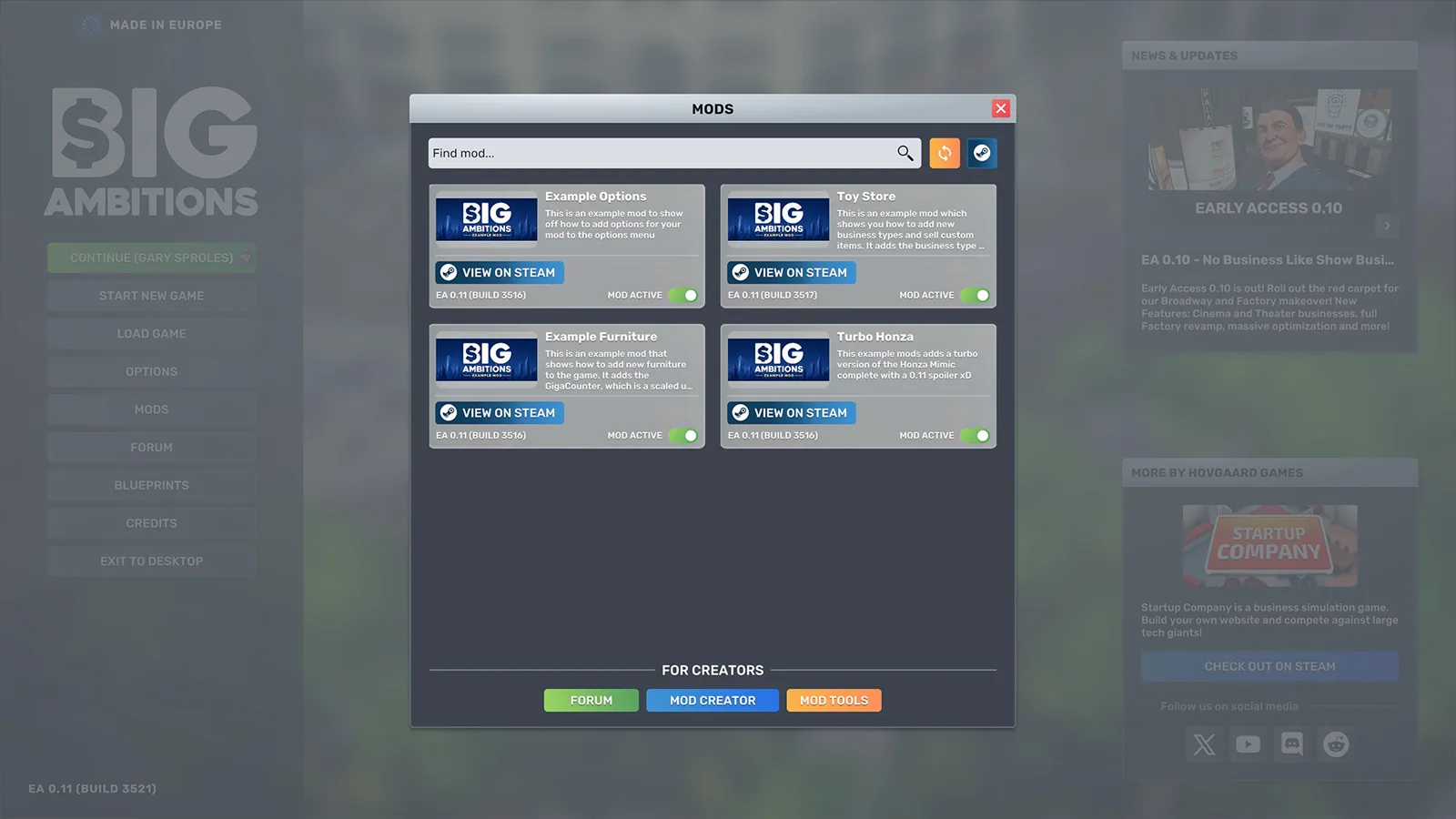
Official mod support and Steam Workshop integration shipped in the full EA 0.11 release on June 18, 2026 and remain available in version 1.0 build 3674. The Workshop contains two fundamentally different kinds of content: code or content mods, and building-layout blueprints.
Confirm the public game build is 3674.
Complete operating playbook
- ARTICLE LENGTH
- 6,369 words
- DEEP-DIVE SECTIONS
- 17
- RESEARCH LEDGER
- 14
Workshop support is live in build 3674
Official mod support and Steam Workshop integration shipped in the full EA 0.11 release on June 18, 2026 and remain available in version 1.0 build 3674. The Workshop contains two fundamentally different kinds of content: code or content mods, and building-layout blueprints.
The official Workshop landing text says players can create and download both mods and building layouts. It also gives different activation paths: subscribed blueprints are installed through interior installation firms, while mods are enabled from the game's main menu. Keeping those paths separate prevents a common false diagnosis in which a blueprint is expected to appear as a mod toggle or a code mod is searched for inside an interior catalog.
The live Workshop exposes filters for item type, building size, building type, business type, and incompatible items. Counts change whenever creators publish, update, hide, or remove entries, so no fixed number belongs in a durable guide. A current page can support the existence of a filter or item, but its count is only a timestamped snapshot. Search-engine snippets and copied lists become stale faster than the Workshop itself.
Build 3674 is the reviewed public build. The September 1 notes fixed an employee quitting bug that could break training, imports, and deliveries, while performance investigation continued. A mod test must therefore separate base-game patch behavior from community behavior. Reproduce suspicious training, import, delivery, frame-rate, or save symptoms once in an unmodded profile before assigning causation to a Workshop item.
Action checklist
- Confirm the public game build is 3674.
- Classify the subscribed item as mod or blueprint before troubleshooting.
- Use live Workshop filters instead of copied item counts.
- Reproduce patch-related symptoms once without community content.
| Workshop content | Normal entry point | Primary risk |
|---|---|---|
| Mod | Subscribe, then enable from the main-menu Mods interface | Code, data, dependency, or save compatibility. |
| Blueprint | Subscribe, then use the appropriate interior installation firm | Wrong building class, outdated objects, paths, or layout assumptions. |
| Sample and SDK project | Official GitHub and Unity workflow | Toolchain or game-DLL mismatch after an update. |
| Roadmap concept implemented by a mod | Optional community content | Being mistaken for a shipped base-game feature. |
Establish a clean baseline before subscribing
Safe modding begins with a known-good base game. Record the game build, protect manual saves, observe the unmodded symptom, and avoid changing several Workshop variables in the same test.
Launch build 3674 with mods disabled and load a disposable copy or separate manual save. Verify that the relevant business, building, route, employee system, and interface work under ordinary conditions. Record the date, build number, difficulty, current neighborhood, save age, and whether the save was created before 1.0. This baseline turns later troubleshooting into a comparison instead of a guess.
Use manual saves in addition to automatic recovery. Developer replies from 2023 and 2024 say the game keeps three recovery saves by default, exposes them through Load and Show recover-saves, and allows recovery count or frequency to be adjusted in options. Those replies predate 1.0, so confirm the current menu before relying on an exact count. Recovery rotation is not an archive: repeated launches and saves can replace the state needed for rollback.
Name checkpoints by purpose and keep the pre-mod checkpoint untouched while testing. One save can represent the clean baseline, another the first enabled item, and another the post-migration state. Do not overwrite the only clean save after a mod converts data or a blueprint updates. If the experiment involves a major portfolio, verify that the save loads, businesses open, employees work, deliveries run, and cash balances are plausible before proceeding.
Action checklist
- Launch once with all mods disabled and confirm the target system works.
- Create a separate manual pre-mod checkpoint.
- Verify the current recovery-save menu, count, and frequency.
- Record build, difficulty, save origin, and active subscriptions.
| Checkpoint | Purpose | Rule |
|---|---|---|
| Clean baseline | Proves base behavior on 3674 | Never overwrite during the test. |
| Single-item test | Isolates one subscription | Enable no unrelated new content. |
| Migration checkpoint | Captures a successful load and save | Keep until several normal cycles pass. |
| Recovery saves | Short rotating safety net | Do not treat as permanent backup. |
Evaluate a Workshop item before installation
A useful Workshop page supplies enough information to reproduce its intended environment. Popularity, awards, attractive screenshots, or a 1.0-compatible title do not replace version history, dependencies, scope, and a clean test.
Read the item description, publication and update dates, change notes, required items, creator comments, known issues, and recent user reports. Check the Workshop's incompatible-item filter, but do not assume an item is safe merely because Steam does not flag it. A creator may not have updated compatibility metadata, and a mod can load successfully while changing balance or corrupting a specific workflow later.
Prefer items whose authors state the tested game build, explain installation and removal, list dependencies, describe changed systems, and respond to current failures. For blueprints, require venue, building class and size, required DLC or modded objects, and a current screenshot of requirements. For code mods, require a narrow feature description and a credible change log. Reject mirrored downloads and SEO pages that separate the file from its Steam identity and update history.
Treat profitability and performance claims as claims. A mod that advertises better profits may alter demand, prices, recipes, capacity, or costs in ways that make base-game guides invalid. A blueprint that calls itself optimal may only optimize decoration or object count. Record the claimed benefit and the metric that could confirm it, then test that metric on a disposable save with the same build and disclosed conditions.
Action checklist
- Read update date, change notes, dependencies, comments, and removal instructions.
- Prefer a disclosed tested build and narrow documented scope.
- Reject third-party mirrors and search-result compatibility summaries.
- Translate every benefit claim into a metric for a controlled test.
| Page signal | Higher confidence | Lower confidence |
|---|---|---|
| Version | Exact game build and recent test | Only a title saying 1.0 compatible. |
| Dependencies | Steam required-items list and load instructions | Unmentioned external files. |
| Maintenance | Dated changes and current replies | Old upload with unresolved recent failures. |
| Claim | Reproducible metric and conditions | Guaranteed profit or performance without evidence. |
Install and test one mod at a time
The safest mod test changes one independent variable. Subscribe, confirm download, enable only the target and required dependencies, load the disposable checkpoint, and run a written smoke test before allowing the item near the main save.
After subscribing, restart or relaunch as Steam and the game's current interface require, then open the main-menu Mods screen. Confirm the target appears, its dependencies are present, and unrelated mods are disabled. Capture the exact enabled list and any order shown. The Workshop About page explains that subscriptions normally become available on the next launch, while individual games can still require in-game activation; Big Ambitions explicitly uses the main-menu enable step.
Run a smoke test that matches the mod's scope. Always verify load, save, reload, time advance, movement, VoogleMaps, BizMan, MarketInsider, employees, deliveries, inventory, and cash. Then test the changed feature. A vehicle mod needs parking, driving, storage, save and reload checks. An economy mod needs several comparable business cycles. A multiplayer or broad systems mod needs its own documented prerequisites and should never be described as an official base-game mode.
Keep the first run short enough that rollback remains obvious, but long enough to cross the mod's state transitions. Some faults appear only at midnight, payday, supplier delivery, employee shift change, business opening, or save reload. Record logs or error text offered by the mod, screenshots of bad state, and the first in-game time at which the symptom appears. Do not enable the next mod until the current one passes.
Action checklist
- Enable only the target item and its documented dependencies.
- Record the complete enabled list and any visible order.
- Test load, save, reload, time advance, employees, deliveries, and finances.
- Cross at least one relevant transition such as midnight or a delivery cycle.
| Test phase | Minimum check | Failure meaning |
|---|---|---|
| Activation | Item and dependencies appear and enable | Subscription, compatibility, or dependency problem. |
| Immediate smoke | Core UI and movement work | Broad conflict or failed initialization. |
| State transition | Shift, day, order, or changed feature completes | Runtime or data logic problem. |
| Persistence | Save closes and reloads correctly | Do not promote the save to main use. |
Blueprints have a different workflow
A blueprint is a layout package rather than a main-menu code toggle. Subscribe through Steam, locate it through the relevant interior installation business, match its building and business filters, and inspect the installed result as if a contractor had delivered it.
Version 0.11 added automatic recognition of subscribed Steam blueprints, game-version filtering, and default Competitive layouts for every business type and size. It also warns that opening an older blueprint updates it and that the updated blueprint cannot be opened in older game versions. Therefore create a checkpoint before opening or resaving an old design if backward compatibility matters.
Match exact building size, building type, and business type. The live Workshop exposes filters including special cinema and theater sizes as well as common retail and office classes. A visually similar shell can have a different entrance, customer maximum, delivery spot, or usable floor area. If the installation firm does not show a subscribed item, first check filters, building match, download completion, game version, and required content rather than enabling it as a mod.
Inspect function after installation. Open BizMan and list every missing requirement; walk the entrance, registers, customer stations, employee needs, storage, bathroom, and delivery paths; check that required objects face the correct way and remain reachable. Count station categories against the building maximum. A blueprint can be aesthetically polished yet under-capacity, over-capacity, difficult to restock, or built around an older product and staffing rule.
Action checklist
- Use an interior installation firm, not the main-menu mod enable path.
- Match game version, building size, building type, and business type.
- Checkpoint before opening or updating an older blueprint.
- Run a live staffed, stocked, customer-path test after installation.
| Blueprint symptom | Likely cause | First check |
|---|---|---|
| Not listed by installer | Filter, building, download, version, or dependency mismatch | Exact Workshop and property categories. |
| Installs but BizMan incomplete | Missing or obsolete required objects | Current business requirement list. |
| Queues despite many objects | Lowest station, staff, or path bottleneck | Hourly graph and category totals. |
| Cannot open in older game | Blueprint was updated by newer version | Use untouched older checkpoint or copy. |
Capacity and business claims inside blueprints
Blueprint object count should be evaluated against the current business chain. More registers, seats, machines, or decorations do not guarantee more useful throughput, customer traffic, or profit.
A developer explanation from January 2024 says each required station category has a separate capacity, the lowest category limits the business, and the result remains capped by the building. This predates 1.0 and must be checked against current BizMan, but it is an excellent blueprint audit. Count every required category independently; never add unlike capacities into one impressive total.
Staff and stock convert theoretical capacity into actual capacity. A layout may contain enough stations but no workable room for eligible employees, restocking, or required facilities. Overlay the planned roster by hour and verify that stock can move from delivery to local storage and shelf. Run the busiest period. If attendance plateaus at a lower category, expand that link; if attendance stays below capacity, the layout is not the acquisition solution.
Reject an optimal-profit label without build, difficulty, district, traffic, demand, competition, prices, marketing, employee training, hours, product costs, and test period. A layout can reduce fit-out time or improve visual quality without being financially superior. State the benefit actually observed: installation cost, requirement completeness, path reliability, station balance, or customer throughput under named conditions.
Action checklist
- Count each required station category separately after installation.
- Apply qualified staff and stock limits to the physical design.
- Compare hourly customers with the lowest capacity ceiling.
- Refuse optimal-profit claims that omit build and test conditions.
| Blueprint claim | Required test | Safe conclusion |
|---|---|---|
| Maximum capacity | Category totals, labor, paths, and building cap | State the lowest verified live ceiling. |
| Best traffic | Location and campaign comparison | A layout does not change the address's baseline by itself. |
| Most profitable | Matched full-cost test | Report local result, never universal rank. |
| 1.0 ready | Successful 3674 install, operation, save, and reload | Compatible in the tested configuration only. |
Build a reproducible compatibility matrix
As the mod set grows, memory is not a test system. Maintain a compact matrix that records exact items, versions, dependencies, save checkpoints, load order if exposed, tested features, and outcomes.
Give each item a stable row using its Workshop title, numeric item URL, creator, last update, declared game version, required items, and local enabled state. Record the actual game build separately. Steam can update a subscribed item between sessions, so a previously good title does not prove the same files are present today. Re-run the relevant smoke test after a meaningful mod or game update.
Test combinations incrementally. Start with a clean baseline, add mod A, then A plus B, then A plus B plus C. If a failure appears after C, repeat C alone where safe and then A plus C or B plus C to find interaction. Do not remove required dependencies randomly from a valuable save. Use disposable copies for binary-search isolation and preserve the last known-good combination.
For broad overhaul mods, keep separate profiles or subscription collections where practical. Economy, time, traffic, building, and employee changes can all invalidate guide assumptions and conflict with one another even if the game launches. Name the profile in every shared test result. A statement about modded capacity or profitability is not evidence about the unmodded 1.0 game.
Action checklist
- Record Workshop item URL, creator, update date, dependencies, and enabled state.
- Record the exact game build independently from the mod title.
- Add combinations incrementally and preserve the last known-good set.
- Name the mod profile when reporting any mechanics result.
| Matrix field | Example content | Why it matters |
|---|---|---|
| Game baseline | Public build 3674, difficulty, save origin | Separates game state from item state. |
| Workshop identity | Numeric URL, creator, last update | Distinguishes renamed or reuploaded items. |
| Dependency set | Required items and enabled order | Makes the combination reproducible. |
| Outcome | Load, transition, persistence, feature checks | Shows more than a successful launch. |
Recovery when the save stops loading
When a modded save fails, preserve evidence and rollback options before experimenting. Repeatedly launching, saving, unsubscribing, and resubscribing can rotate recovery slots or deepen a data mismatch.
Stop and copy the logical test plan into notes outside the save: last known-good build, last session date, enabled items, recent updates, dependencies, and the first error. Do not overwrite the manual pre-mod checkpoint. From the Load menu, inspect Show recover-saves if present. Developer replies state that backups are safe and that three recoveries were the historical default, but confirm the current options because those replies are older than 1.0.
Create a disposable copy of the affected state if the interface permits and disable all optional mods. Keep required dependencies paired with their parent during planned tests. Attempt the clean baseline, then the last known-good set, then the current set. If the save requires a removed content mod to deserialize its data, resubscribe to the exact Workshop item and version available rather than replacing it with a similarly named upload.
If a recovery opens, do not immediately declare success. Inspect businesses, buildings, employees, inventories, vehicles, routes, cash, calendar, and mod-specific objects. Save under a new name, close the game, and reload. Advance through a relevant day or supplier cycle. A file that reaches the map but loses modded assets, workplaces, or data is a partial recovery and should not replace the untouched source until the damage is understood.
Action checklist
- Stop overwriting saves and record the exact last known-good set.
- Inspect current recovery saves before rotating them through more launches.
- Restore exact dependencies rather than substituting similarly named items.
- Audit state, save under a new name, reload, and cross a transition.
| Recovery step | Goal | Do not |
|---|---|---|
| Preserve | Keep pre-mod and failed states untouched | Continue saving over both. |
| Identify | Reconstruct exact build and item set | Rely on memory or title alone. |
| Load | Use disposable copies and recovery slots | Experiment on the only viable file. |
| Verify | Check state, persistence, and transitions | Assume reaching the map means full recovery. |
Diagnose crashes, missing content, and bad behavior
Different symptoms call for different isolation paths. Separate activation failure, dependency failure, save-data failure, runtime conflict, blueprint mismatch, and base-game regression before choosing a remedy.
If an item does not appear, confirm Steam subscription and download, restart, inspect the correct Big Ambitions menu, and check dependencies and compatibility filters. Remember that blueprints appear through interior installation firms rather than the mod toggle. If a mod appears but cannot enable, compare the creator's required game and dependency versions. A missing Workshop page may mean the creator hid or removed the item, which can make exact restoration difficult.
If the game crashes or a save fails only with several mods, reproduce on a disposable copy, then reduce the set systematically. Disable half of optional independent items, retest, and continue until a minimal failing combination is found. Do not separate a parent from a required library during the search. Record whether the fault occurs at launch, load, midnight, employee shift, delivery, interaction, or save; timing narrows the responsible system.
If behavior is wrong but the game remains open, compare against the clean baseline. Build 3674 fixed training, import, and delivery failures tied to an employee quitting bug, while frame-rate work remained ongoing. Update first and test unmodded. For balance claims, inspect whether a mod intentionally changes demand, traffic, price, capacity, recipes, or time. A deliberate overhaul is not a base-game bug, but an undocumented side effect is still useful evidence for the creator.
Action checklist
- Confirm the correct activation path for mod versus blueprint.
- Reduce optional mods systematically on a disposable save.
- Keep parents and required libraries together during isolation.
- Compare the minimal failure with an updated unmodded baseline.
| Symptom | Likely class | Isolation move |
|---|---|---|
| Item absent | Download, path, filter, or dependency | Verify subscription and correct in-game entry point. |
| Crash at load | Initialization, dependency, or save-data conflict | Find minimal enabled set on copy. |
| Failure at midnight or delivery | Runtime transition | Retest exact transition clean and singly. |
| Blueprint unavailable | Building, business, version, or installer mismatch | Match all filters and property class. |
Safe removal and post-removal audit
Unsubscribing is not always the first removal step. A mod can own objects, vehicles, businesses, recipes, or serialized data that the base game cannot interpret after the files disappear. Read the creator's removal procedure and unwind content on a copied save.
Before disabling, identify everything the mod added or changed. Sell, delete, replace, or deactivate mod-owned assets only if the creator instructs and the copied save can be verified. Stop mod-specific production, empty special inventories, and remove dependent layouts where necessary. Create a named pre-removal checkpoint. Then disable the item through the game, keep required libraries until no parent needs them, and launch the copied save.
Audit the whole state after removal. Check every district, property, employee, vehicle, inventory, recipe, delivery route, schedule, price, loan, investment, tax projection, and calendar. Missing assets can expose blocked paths or reduce station capacity even if the save loads. Run through midnight, payroll, supplier delivery, and at least one business peak, then save under a new name and reload.
Unsubscribe only after the disabled state is known to load and persist, unless the creator explicitly requires a different order. Keep the last known-good modded checkpoint. If removal is destructive by design, decide whether continuing the modded branch is safer than forcing migration. A clean base-game future may require abandoning mod-owned progress; that tradeoff should be stated rather than hidden behind a one-click removal promise.
Action checklist
- Read the creator's exact removal instructions before disabling.
- Inventory and unwind mod-owned assets on a copied save.
- Retain shared dependencies until every parent is removed.
- Audit, cross transitions, save under a new name, and reload before unsubscribing.
| Removal phase | Pass condition | Rollback point |
|---|---|---|
| Preparation | Mod-owned state identified and checkpointed | Untouched pre-removal save. |
| Disable | Copied save loads without the item | Last known-good enabled set. |
| Transition | Businesses, deliveries, and midnight complete | Pre-transition disabled copy. |
| Persistence | New save reloads with coherent state | Original modded branch. |
Official SDK setup for mod creators
Hovgaard Games publishes a Big Ambitions modding repository with a sample project and workflow. Its README is the primary reference for creators; community videos can supplement it but should not replace its exact toolchain requirements.
The repository currently specifies Unity Hub, Unity 2022.3.62f2, the macOS Build Support module, a C-sharp development environment, an installed Steam copy of Big Ambitions, and Git. Use the exact Unity editor listed by the repository rather than the newest available editor. Importing or upgrading the project in a different Unity version can change assets and project files before the mod has a clean baseline.
Clone the official repository, open the project through Unity Hub, and follow the welcome flow that imports the game's DLLs. The manifest supports localization, dependencies, and asset bundles. Use the provided Build and Install action: the README says it validates, compiles, and installs to the local ModsLocal area. After a Big Ambitions update, reimport the game DLLs before assuming a compile or runtime failure belongs to the mod's code.
Keep source control clean and test a minimal example before adding features. Commit the untouched template state, the successful DLL import, and each isolated feature. Do not redistribute proprietary game files merely because the tool imports references locally. Follow the repository license and contribution instructions, and use pull requests for improvements where appropriate. The public repository's commit count is a changing snapshot, not a compatibility guarantee.
Action checklist
- Install the exact Unity 2022.3.62f2 editor and required module from the README.
- Clone the official Hovgaard Games repository and import game DLLs through its workflow.
- Build and install a minimal sample before implementing broad features.
- Reimport DLLs after game updates and keep project changes in source control.
| SDK component | Official requirement or role | Common failure |
|---|---|---|
| Unity | 2022.3.62f2 through Unity Hub | Opening with a different editor version. |
| Build module | macOS Build Support as specified | Incomplete editor installation. |
| Game DLLs | Imported from installed Steam game | Stale references after a game update. |
| Build and Install | Validate, compile, install to ModsLocal | Skipping validation and copying ad hoc files. |
Manifest, dependencies, localization, and assets
A maintainable mod states what it is, what it needs, what it changes, and how the game should load its content. The official SDK manifest and asset-bundle workflow provide the structure for those declarations.
Give the mod a stable identifier and human-readable metadata according to the sample project. Declare dependencies rather than relying on users to infer them from a description. Keep dependency scope narrow and version assumptions documented. A shared library can reduce duplication, but it also becomes a single point of failure, so test the parent with the exact dependency set that will be published.
Use localization fields instead of hard-coding all visible language strings. Keep keys stable across updates so existing saves or translations do not lose references. Package visual and data assets through the repository's asset-bundle flow, and validate naming, size, and platform requirements. Test missing-localization and missing-bundle behavior on a fresh installation rather than a developer machine that may contain leftover local files.
Document save impact. State whether disabling the mod removes objects, invalidates recipes, changes businesses, or leaves persistent data. Provide a safe removal order where possible. Version the mod meaningfully and maintain a change log that names migrations and breaking changes. A subscriber should be able to decide whether an update is safe before Steam downloads it automatically.
Action checklist
- Use a stable identifier and complete human-readable metadata.
- Declare every required dependency and test the exact published set.
- Keep localization keys stable and test without developer leftovers.
- Document persistence, removal, migrations, and breaking changes.
| Package area | Good practice | Subscriber benefit |
|---|---|---|
| Identity | Stable ID and semantic version | Updates map to the correct installed mod. |
| Dependencies | Explicit required items and versions | Missing libraries are diagnosable. |
| Localization | Stable keys and translated visible strings | Updates do not silently break text. |
| Persistence | Removal and migration notes | Players can protect saves before updating. |
Upload through the in-game Mod Creator
The official README describes an in-game publishing flow. Build and test locally first, then use Mods, Mod Creator, and Create new mod or Edit mod to select the package, provide metadata, and upload to Steam Workshop.
Use Browse mod folder to select the built local mod, not the source-project root unless the README specifies that structure. Select a thumbnail placed at the mod root, complete the title, description, visibility, tags, and other required fields, and review dependencies. The README says upload can fail when required fields are missing, the build failed, or the thumbnail exceeds one megabyte.
Publish a private or limited test first where the interface permits. Subscribe from a clean player setup rather than relying only on ModsLocal, because the Workshop package can differ from the development folder. Verify download, activation, dependencies, changed feature, save, reload, and removal. Check that the description accurately names the tested game build and does not promise compatibility that was not exercised.
For updates, explain whether existing saves migrate, whether users must remove old objects, and whether dependencies changed. Preserve the Workshop identity rather than reuploading a new item without need, because subscribers and references rely on the numeric item URL. If the game updates, reimport DLLs, rebuild, rerun the clean test, and then change the compatibility statement.
Action checklist
- Build and validate locally before opening Mod Creator.
- Use the built mod folder and a root thumbnail no larger than one megabyte.
- Complete every required field and dependency declaration.
- Test the subscribed Workshop package on a clean setup before broad publication.
| Upload stage | Check | Failure response |
|---|---|---|
| Build | Validation and compilation succeed | Fix local errors before upload. |
| Metadata | Required fields, tags, description, dependencies complete | Do not publish ambiguous scope. |
| Thumbnail | Root file within one-megabyte limit | Resize or replace before retry. |
| Workshop test | Clean subscription loads, saves, and removes as documented | Revise package and compatibility claim. |
Worked example: isolate a broken delivery mod
This example demonstrates method and uses fictional item names. It does not accuse a real Workshop creator or claim a known build-3674 defect.
A save uses RoutePlus, EconomyTune, and VehiclePack. After a Workshop update, Monday imports arrive but smart deliveries stop. The player first updates Big Ambitions to 3674 because the patch fixed an employee-related delivery failure. A clean unmodded copy completes a delivery, showing that the current base setup can work. The original pre-update checkpoint remains untouched.
On disposable copies, RoutePlus alone fails at the first scheduled departure, EconomyTune alone passes, and VehiclePack alone passes. RoutePlus plus VehiclePack fails only when the route uses a modded van; RoutePlus with a base vehicle passes. The minimal failing combination is therefore narrower than RoutePlus always breaks deliveries. The report records game build, both Workshop URLs and update dates, route time, vehicle, driver schedule, warehouse stock, and the exact transition.
The player returns to the last known-good set, substitutes a base vehicle, saves under a new name, reloads, and crosses the next delivery. The main save is not overwritten until the creator responds or an update passes the same matrix. This process preserves progress and gives the creator reproducible evidence. Randomly disabling all libraries or buying another warehouse would not have isolated the interaction.
Action checklist
- Update and reproduce the symptom on an unmodded disposable copy.
- Find the minimal failing item combination and exact transition.
- Record route, vehicle, schedule, inventory, builds, and Workshop identities.
- Use a verified workaround without overwriting the last known-good save.
| Illustrative test | Result | Inference |
|---|---|---|
| Unmodded 3674 | Pass | Not reproduced as a clean current-build failure. |
| RoutePlus alone with base vehicle | Pass | Mod is not sufficient in this path. |
| VehiclePack alone | Pass | Vehicle pack is not sufficient alone. |
| RoutePlus plus modded van | Fail | Minimal observed interaction for creator report. |
Worked example: validate a cinema blueprint
This example uses hypothetical capacities to show a blueprint audit. The numbers are not official cinema values and must be replaced with the current property's panels.
A subscribed blueprint claims 1.0 compatibility for a specific cinema size. On a disposable save, the player confirms the building class, uses the interior installation firm, and installs it. BizMan recognizes all required objects, but the audit finds nominal seating for 150, screening capacity for 100, staffed projection capacity for 75 at peak, and a building maximum of 150. The useful initial ceiling is 75.
The player fixes the projectionist schedule without buying objects. Capacity rises to the screening limit of 100. During a matched evening, the hourly graph reaches 98 and a concession queue grows, while one product stocks out. The layout is compatible in the narrow sense that it loads and functions, but its published optimal claim remains unproven because specialist and concession workflow require revision.
After moving one register worker and increasing only the depleted product's buffer, the peak operates cleanly. The player saves, reloads, and repeats a day. The final note credits the blueprint for complete requirements and usable paths but records a peak station imbalance under the tested roster. That original synthesis is more useful than either declaring the blueprint broken or repeating its marketing language.
Action checklist
- Match building and business filters before installation.
- Audit requirements, categories, staffed capacity, paths, and stock.
- Run a matched peak, save, reload, and repeat.
- Report the observed benefit and limitation without universal ranking.
| Illustrative layer | Nominal | Initial useful amount |
|---|---|---|
| Building | 150 | 150 hard maximum. |
| Seating | 150 | 150. |
| Screening | 100 | 100. |
| Projectionist coverage | 75 | 75 at tested peak. |
| Result | Not additive | 75 until the schedule is corrected. |
Live base game, roadmap, and community boundaries
Mods can prototype almost anything, which makes evidence labels essential. A Workshop implementation is not a shipped base-game feature, and an official roadmap item is not live merely because a mod uses the same idea.
The Steam store lists Big Ambitions as single-player and Workshop-enabled. If a Workshop item advertises multiplayer, boats, a ferry, another city, or a major economy overhaul, describe that functionality as community content with dependencies and compatibility risk. Do not rewrite the base-game feature list around it. The creator, not the official changelog, defines its scope.
The official roadmap and December 2025 studio update discuss post-release content and future Shanghai plans. Roadmaps communicate intent, not installed code, and their dates, prices, or scope can change. A mod that implements a boat does not prove the official boat system has shipped. Require a dated public-branch release note before moving a feature from roadmap to current.
Likewise, a public SDK does not mean every internal system is stable for modification. Build 3674 remains the game baseline, and the official notes still mentioned ongoing frame-rate investigation. After every game update, reimport DLLs for development, retest subscriptions, and label results. A clean mod-free reproduction belongs in a base-game report; a failure requiring a particular set belongs in a compatibility report.
Action checklist
- Label every Workshop-added system as modded.
- Require an official shipped note before calling roadmap content base game.
- Separate single-player store facts from community multiplayer experiments.
- Retest and relabel compatibility after every relevant game update.
| Feature evidence | Status | Correct wording |
|---|---|---|
| Official public release note | Shipped base game | Available in the named build. |
| Official roadmap | Planned | Future intent; scope and timing uncertain. |
| Workshop mod | Optional community extension | Available only with the named item and tested set. |
| Creator compatibility title | Unverified claim | Compatible only after reproduction. |
Final safe-modding audit
Run this audit before promoting a modded checkpoint to the main playthrough, after every game or item update, and before removing a persistent-content mod. A pass means the configuration is identified, reproducible, recoverable, and honestly labelled.
Identity audit: the game is on build 3674; each item has a numeric Workshop URL, creator, update date, dependencies, and enabled state; mods and blueprints use the correct entry path; the tested profile is recorded; and dynamic listing counts or popularity are not used as compatibility evidence. Third-party mirrors, SEO summaries, and stale Fandom instructions have no control over installation.
Safety audit: an untouched clean manual save and last known-good modded save exist; current recovery options have been verified; new items were added one at a time; the test crosses relevant transitions; save and reload pass; removal instructions are known; and mod-owned assets are inventoried. No experiment overwrites the only recoverable state, and shared dependencies are not removed while another parent needs them.
Evidence audit: blueprint capacity is measured by current required categories, staffing, building cap, paths, stock, and hourly customers. Code-mod behavior is compared with an unmodded baseline and minimal combination. Profit, performance, and compatibility claims state build and conditions. Workshop features remain community content, roadmap remains future, and SDK projects are rebuilt after DLL changes. Uncertainty is preserved wherever the source or reproduction is incomplete.
Action checklist
- Pass identity, baseline, activation, transition, persistence, and removal checks.
- Keep untouched rollback points outside the active experiment chain.
- Report minimal combinations and exact conditions instead of blame by title.
- Fail the audit if compatibility depends on an unrecorded or unrecoverable state.
| Audit domain | Pass condition | Failure response |
|---|---|---|
| Identity | Exact Workshop items and build recorded | Reconstruct before more testing. |
| Recovery | Clean and last-good checkpoints load | Stop writes and inspect recoveries. |
| Compatibility | Feature, transitions, save, and reload pass | Find minimal failing set. |
| Claims | Versioned, reproducible, and correctly scoped | Relabel as uncertain or remove. |
Research ledger
These links establish mechanics or provide a reproducible lead. Any balance-sensitive number still has to be checked in the current save.
Questions answered
Are mods officially supported in Big Ambitions 1.0?
Yes. Official mod support, Steam Workshop integration, an in-game uploader, tools, and sample mods shipped in EA 0.11 and remain in 1.0. Individual Workshop items are community content, however; official support for the framework is not a guarantee that every item is compatible, balanced, maintained, or safe for every save.
Why does a subscribed blueprint not appear in the Mods menu?
Because blueprints use a different workflow. The official Workshop text says subscribed building layouts are installed through interior installation firms, while mods are enabled from the main menu. Match the exact building size, building type, business type, game-version filter, download state, and dependencies.
Does a title saying 1.0 compatible prove an item works on build 3674?
No. It is a creator claim until tested. Read update history, required items, comments, scope, and removal instructions, then reproduce activation, changed behavior, transitions, save, and reload on a disposable 3674 checkpoint. State compatibility only for the exact tested configuration.
How many recovery saves are available?
Developer replies from 2023 and 2024 say three were the default and that count or frequency could be adjusted in options, with Show recover-saves available from Load. Those statements predate 1.0, so inspect the current menu. Rotating recoveries are a short safety net, not a replacement for named manual checkpoints.
What is the safest way to find a conflicting mod?
Use disposable save copies and a known-good unmodded baseline. Add items one at a time or reduce a failing set systematically, keeping each parent with required libraries. Record the exact build, numeric Workshop URLs, update dates, enabled set, and first failing transition. Preserve the last known-good combination.
Can a mod be removed by simply unsubscribing?
Not safely in every case. Persistent mods may own objects, recipes, vehicles, buildings, or serialized data. Read the creator's removal procedure, checkpoint, unwind mod-owned state on a copy, disable, audit, cross transitions, save and reload, and unsubscribe only after the disabled state is verified or the instructions require another order.
Which Unity version should a creator use?
The official repository currently specifies Unity 2022.3.62f2 through Unity Hub and the macOS Build Support module, plus a C-sharp environment, Steam installation of Big Ambitions, and Git. Follow the repository if it changes; do not assume the newest Unity editor is compatible.
Why can an upload fail in Mod Creator?
The official README identifies missing required fields, a failed build, and a thumbnail larger than one megabyte as failure causes. Build and validate first, select the built mod folder and root thumbnail, complete metadata and dependencies, then test the subscribed Workshop package from a clean player setup.
Can a Workshop mod make a roadmap feature current?
No. It can implement a community version of an idea, but the base-game feature remains roadmap until a dated official public-branch release note says it shipped. Describe modded multiplayer, boats, ferries, cities, or economy systems with the exact item and dependencies, not as unmodded 1.0 functionality.